
Spent all your money on upgrading your computer rig and all that is left for your new monitor is $100?
Don’t worry — nowadays, you can get an exquisite monitor under $100.
Check out the top four best gaming monitors under 100 USD available right now as well as everything you need to know about them.
| Monitor | Size | Panel | Resolution | Refresh Rate | VRR | |
|---|---|---|---|---|---|---|
| 24” | IPS | 1920x1080 | 180Hz | FreeSync | ||
| 24” Curved | VA | 1920x1080 | 180Hz | FreeSync | ||
| 24” | IPS | 2560x1440 | 100Hz | FreeSync |

Sansui ES-G24F4
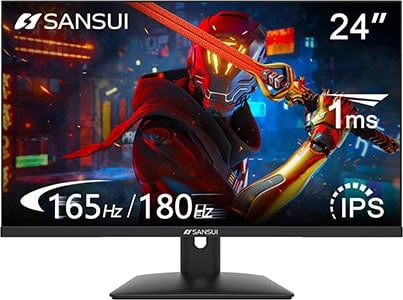
- Wide color gamut
- Fast response time
- VRR up to 180Hz
The following displays are the best gaming monitors for 100 dollars or less currently available.
Take note of our guidelines and tips because each monitor is a little bit different and only one is the perfect fit for you.
We will help you make sure that the monitor you pick has the right panel type, response time speed and other features for you.
If you want to view our changelogs for this particular buying guide, you can do so at the end of this article.
Sansui ES-G24F4
Best Gaming Monitor Under 100 USD
Size: 23.8”
Panel: IPS
Resolution: 1920×1080
Refresh Rate: 180Hz
VRR: FreeSync
The Pros:
- Wide color gamut
- VRR and MBR up to 180Hz
- Fast response time
- Slim design with a VESA mount compatible screen
- Headphone jack
The Cons:
- Tilt-only stand
About The Monitor
Nowadays, it’s also possible to get a 144Hz+ gaming monitor on sale. The Sansui ES-G24F4 with 180Hz goes for $85 – $106!
Image Quality
Even though it’s one of the most affordable 24″ 1080p high refresh rate gaming monitors, the Sansui ES-G24F4 actually offers impressive performance and image quality.
To start with, it has a wide 110% sRGB gamut for more vibrant colors, as well as a decent 300-nit peak brightness.
Next, it has a rapid pixel response time, resulting in no ghosting behind fast-moving objects.
VRR is supported via AMD FreeSync and NVIDIA G-SYNC Compatible for tear-free gameplay up to 180FPS. You also get more useful gaming features, including crosshair overlays, a refresh rate tracker, on-screen timers and Blacklevel.
Backlight strobing is also supported, which is an optional feature called MPRT for reduced motion blur at the cost of picture brightness.
Design & Connectivity
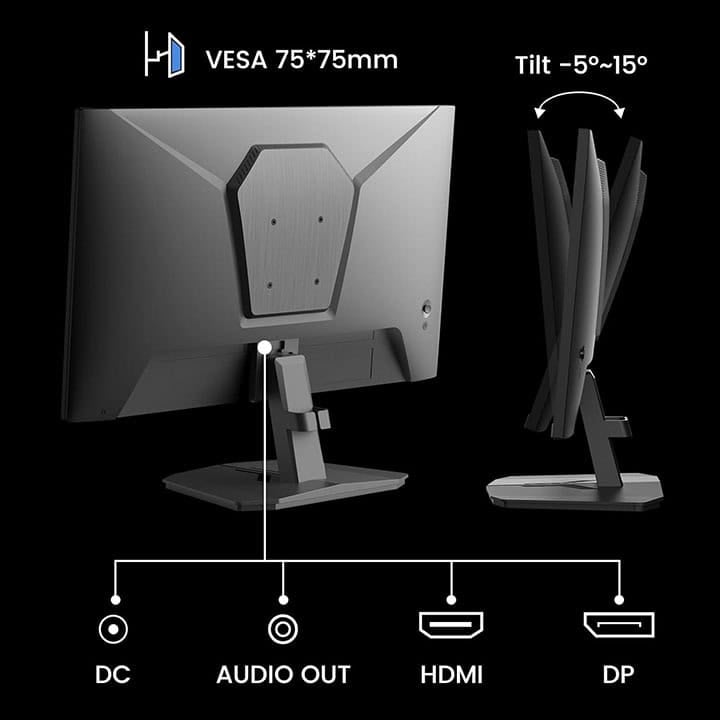
The stand of the monitor is tilt-only, but the screen is VESA mount compatible, so we highly recommend investing in a third-party stand. A basic ~$20 desk-clamping stand will provide you with more ergonomics than any stand, declutter your desk and you can use it in the future for other monitors.
Connectivity options include DisplayPort 1.4, HDMI 2.0 and a headphone jack.
Alternatives
Other good options for ~$110, include the MSI G244F E2, the Pixio PX248 Wave and the KTC H25T7.
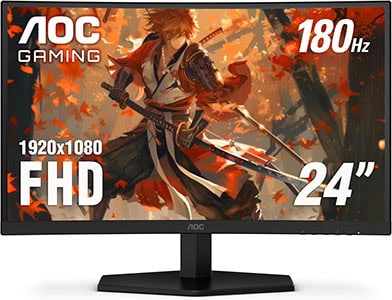
AOC C24G42E
Best Curved Gaming Monitor Under 100 USD
Size: 23.8”
Panel: VA
Resolution: 1920×1080
Refresh Rate: 180Hz
VRR: FreeSync
The Pros:
- Crisp image quality
- VRR and MBR up to 180Hz
- High contrast ratio
- Wide color gamut
The Cons:
- Minor smearing in fast-paced games, mostly noticeable in dark scenes
- VRR brightness flickering in dark scenes of games with fluctuating frame rates (expected drawback of OLED and VA panels)
- Tilt-only stand
About The Monitor
If you’d rather have a curved display, check out the AOC C24G42E!
Image Quality
The AOC C24G42E is based on a VA panel with a high 3,000:1 contrast ratio for deep blacks! It also has a wide 90% DCI-P3 gamut coverage for vibrant colors and an sRGB emulation mode in case you prefer better accuracy.
The main downside of VA panels is the slower pixel response time speed, which results in minor ghosting behind fast-moving objects, mainly in darker scenes.
So, if you’re mainly looking for a display for competitive FPS games or are particularly sensitive to ghosting artifacts, go with the IPS monitor instead.
In some games, VA monitors also exhibit VRR brightness flickering, so you’ll have to disable variable refresh rate in those titles.
The AOC C24G42E offers plenty of features, including MBR, on-screen crosshair, Shadow Control (improves visibility in dark games), a refresh rate tracker, etc.
Design & Connectivity
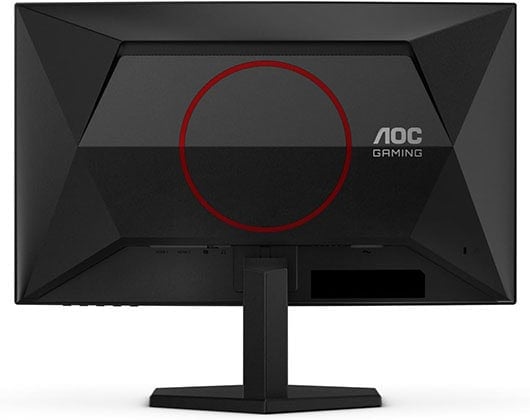
The stand of the monitor is tilt-only, but the screen is VESA mount compatible via the 100x100mm pattern.
The AOC C24G42E has a moderate 1500R screen curvature, but since it has a small 24″ display, it’s not that noticeable in real use. It adds a bit of extra depth without distorting the image too much, but there are other reasons to get this monitor.
Connectivity options include two HDMI 2.0 ports, DisplayPort 1.2, a headphone jack and dual 2W integrated speakers.
Alternatives

KTC H24T27
1440p Monitor Under 100 USD
Size: 23.8”
Panel: IPS
Resolution: 2560×1440
Refresh Rate: 100Hz
VRR: FreeSync
The Pros:
- Wide color gamut
- Crisp image quality, accurate colors
- FreeSync up to 100Hz
- High pixel density
The Cons:
- IPS glow and mediocre contrast ratio (as expected from this panel technology)
- Tilt-only stand
About The Monitor
In case you’d rather have a higher resolution than refresh rate, the KTC H24T27 is an excellent 1440p display!
Image Quality
The KTC H24T27 has a screen resolution of 2560×1440, which results in a higher pixel density of 123 PPI (pixels per inch), providing you with more screen space as well as noticeably sharper details and text!
The 100Hz refresh rate still provides you with a noticeable jump in motion clarity in comparison to 60-75Hz displays, which makes the monitor suitable for both gaming and office-related work.
It has an IPS panel with wide viewing angles, wide color gamut, a decent 1300:1 contrast ratio and a 300-nit peak brightness.
Design & Connectivity

The KTC H24T27 has a tilt-only stand, but you can detach it and mount the screen on a third-party stand via the 100x100mm VESA pattern.
Connectivity options include HDMI 2.0, DisplayPort 1.4, a USB port for firmware updates and a headphone jack.
Conclusion
What’s the bottom line?
Overall, we find that most users will be most satisfied with the Sansui ES-G24F4 thanks to its IPS panel with wide viewing angles, wide color gamut, fast response time and 180Hz refresh rate.
If you don’t mind a bit of screen tearing and ghosting, and would rather have a higher contrast ratio for deeper blacks, get the AOC C24G42E.
In case you want a display primarily for office-related work and some light gaming on the side, the KTC H24T27 is an excellent option thanks to its 1440p 100Hz IPS panel.
Still not sure which monitor to purchase? Leave us a question below and we’ll gladly help you out!
Updates +
- January 23, 2026:
– Repalced the KTC H24F8 with the Sansui ES-G24F4. - November 21, 2025:
– Added the AOC C24G42E and the KTC H24T27.
– Removed the Acer SH242Y Ebmihx, the Acer KC242Y Hbi, the Sceptre E248W-FW100T and the Sceptre C248W-1920RNT. - April 17, 2025:
– Replaced the KTC H24T09P with the KTC H24F8. - November 22, 2024:
– Checked up on the guide to ensure that our picks are still the best options available. - July 27, 2024:
– Added the KTC H24T09P. - October 28, 2023:
– Replaced the Acer SB242Y EBI with the Acer SH242Y Ebmihx.
– Added the Sceptre E248W-FW100T. - June 6, 2023:
– Added the Acer SB242Y EBI, the Acer KC242Y Hbi and the Sceptre C248W-1920RNT.
– Removed the Acer SB220Q and the Aopen 22SA2Q and 24SA2Y models. - January 18, 2023:
– Added the Aopen 22SA2Q and 24SA2Y.
– Removed the AOC 22V2H, the Philips 226E9 and the Aopen 22CV1Q. - November 24, 2022:
– Checked up on the guide to ensure that our picks are still the best options available. - November 24, 2021:
– Checked up on the guide to ensure that our picks are still the best options available.


