
Looking for the best monitor for gaming for under 300 USD?
We’ve picked out the absolute best choices available in the $250-$300 range, including proper HDR, Dual Mode, eSports, 1440p, ultrawide and 4K models!
These are the best monitors under $300 for gaming, but some of the listed displays are also great for other activities, including designing, editing, watching movies, etc.
| Type | Monitor | Size | Panel | Resolution | Refresh Rate | |
|---|---|---|---|---|---|---|
| Best HDR Gaming Monitors | 27” | VA | 2560x1440 | 180Hz | ||
| 27” | VA | 2560x1440 | 180Hz | |||
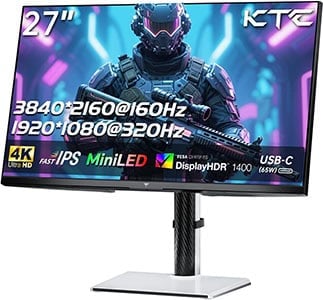
| Best 4K 144Hz+ Gaming Monitor | 27” | IPS | 3840x2160 | 4K 160Hz, 1080p 320Hz | ||
| Best 32" 1440p Gaming Monitor | 32” | VA | 2560x1440 | 240Hz | ||
| Best 1080p Gaming Monitors | 24” | IPS | 1920x1080 | 240Hz | ||
| 25” | IPS | 1920x1080 | 310Hz | |||
| Best UltraWide Gaming Monitors | 34” | VA | 3440x1440 | 165Hz | ||
| 34” | IPS | 3440x1440 | 144Hz |

AOC Q27G40XMN

- 27″ 1440p 180Hz
- 1152-zone mini LED FALD
- 1200-nits peak brightness

Sceptre E345B-QUN168W

- 34″ 3440×1440 144Hz
- Fast response time
- Smooth VRR performance
All of the included monitors have proven reliable performance and you can rest assured that they are worth the money; just make sure to follow our guidelines and recommendations and we guarantee you’ll pick the ideal monitor for your needs.
Now, some of the monitors we picked are only available for under $300 when they’re on sale, but they’re worth the investment or the wait for a sale regardless. We’ll also mention noteworthy alternatives in the review summaries below.
If you want to view our changelogs for this particular buying guide, you can do so at the end of this article.
Best HDR Gaming Monitors
Yep! Nowadays, you can even get proper HDR displays for less than $300!
AOC Q27G40XMN
Best HDR Gaming Monitor Under $300
Size: 27”
Resolution: 2560×1440
Panel: VA
Refresh Rate: 180Hz
The Pros:
- High peak brightness, HDR-1000
- Wide 97% DCI-P3 color gamut
- 1152-zone mini LED FALD
- Plenty of features, including VRR up to 180FPS
The Cons:
- Tilt-only stand
- Minor blooming/haloing noticeable in certain scenes
- Minor ghosting in darker scenes
- VRR brightness flickering in dark scenes of games with fluctuating frame rates (expected drawback of VA panels)
About The Monitor
The AOC Q27G40XMN is one of the best gaming monitors you can get for under $300 – here’s why!
Image Quality
Thanks to its 1152-zone mini LED FALD (full-array local dimming) solution, the AOC Q27G40XMN provides you with proper HDR image quality!
These zones can individually dim areas of the image that are supposed to be dark without greatly affecting the parts of the screen that are supposed to remain bright, thus significantly increasing the contrast ratio!
Naturally, since there are ‘only’ 1152 zones across the screen when there’s a small bright object (such as stars in a night sky, fireworks, etc.), the light from that object can bleed into the surrounding dimmed zones and create blooming.
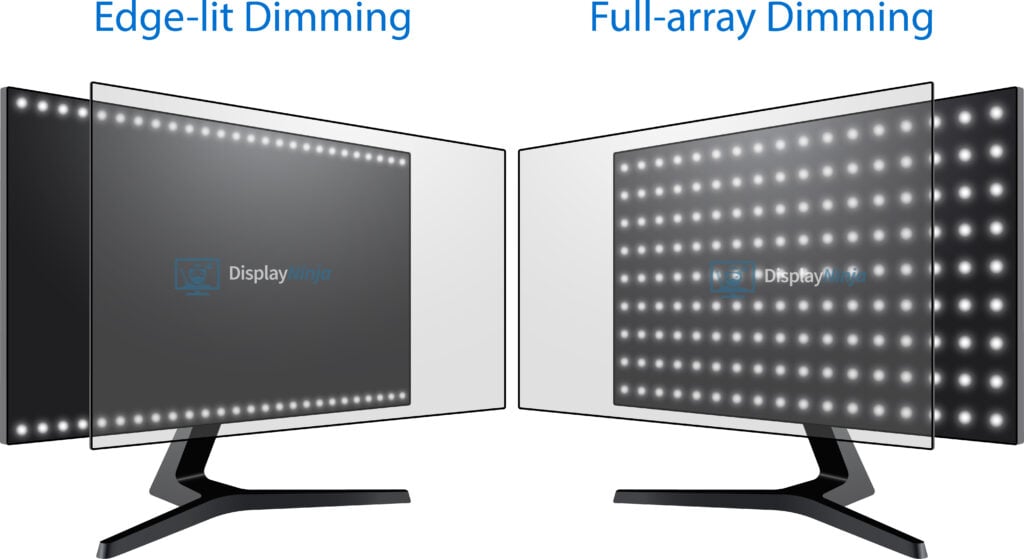
The amount of blooming is tolerable considering that it only occurs in these demanding scenes.
A 1152-zone solution is still very effective, especially in comparison to the “semi-HDR” displays with 8 to 32 edge-lit zones. In fact, the first FALD displays had 384 zones and went for $2,000. You can see our PG27UQ review for more details.
Moving on, the AOC Q27G40XMN can get very bright with a 1200-nit peak brightness and it has a wide color gamut with 97% DCI-P3 color space coverage.
Now, while it doesn’t have a slow response time speed as traditional VA displays, there’s still some minor ghosting behind fast-moving objects, mainly in dark scenes, but most users won’t mind it.
VRR is supported up to 180Hz for tear-free gameplay, and you get plenty of gaming features, such as Shadow Boost, Game Color, crosshair overlays, on-screen timers, picture presets and a refresh rate tracker.
As is the case with all VA and OLED monitors, there’s some VRR brightness flickering in certain scenes (usually in games with fluctuating frame rates or in loading screens and in-game menus, we recommend just disabling VRR in affected titles).
Check out our AOC Q27G40XMN review for more information.
Design & Connectivity

The stand of the monitor is tilt-only, but it’s VESA mount compatible via the 100x100mm pattern.
Connectivity options include two HDMI 2.0 ports, DP 1.4 and a headphone jack.

KTC M27T6
DisplayHDR 1400 Monitor Under $300
Size: 27”
Resolution: 2560×1440
Panel: VA
Refresh Rate: 180Hz
The Pros:
- High peak brightness, HDR-1400
- Wide 96% DCI-P3 color gamut
- 1152-zone mini LED FALD
- Plenty of features, including VRR up to 180FPS
The Cons:
- Minor blooming/haloing noticeable in certain scenes
- Minor ghosting in darker scenes
- Brightness higher than intended in some scenes
- VRR brightness flickering in dark scenes of games with fluctuating frame rates (expected drawback of VA panels)
About The Monitor
The KTC M27T6 is another excellent mini LED monitor under $300!
Image Quality
It has an even higher brightness than the AOC Q27G40XMN with DisplayHDR 1400 certification, reaching up to 1800-nits!
However, its EOTF tracking is higher than intended for most APLs between ~50% and 80% white, resulting in lifted midtones and a lack of image depth in some scenes.
So, if you prefer HDR accuracy, the Q27G40XMN is a better option. The M27T6 is all about brightness.
Just like the Q27G40XMN, it has 1152 dimming zones, a similar 96% DCI-P3 color gamut, a 180Hz refresh rate, and typical gaming features, such as VRR, Black Equalize, crosshair overlays, etc.
Check out our full KTC M27T6 review for more information.
Design & Connectivity
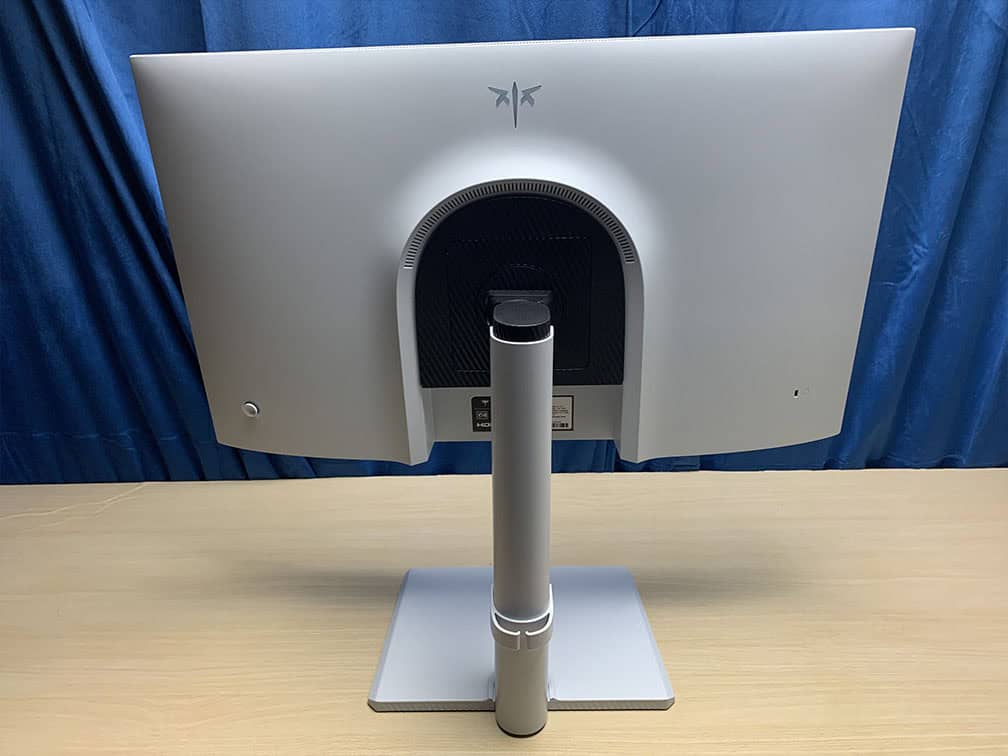
The stand of the monitor offers height adjustment up to 130mm, -5°/20° tilt, +/- 90° pivot, +/- 45° swivel and 100x100mm VESA mount compatibility.
Connectivity options include two HDMI 2.0 ports, DP 1.4, a headphone jack and a USB port for firmware updates.
Best 4K 144Hz+ Gaming Monitors
Want a 4K monitor with a high refresh rate? You can even find some Dual Mode variants for less than $300!
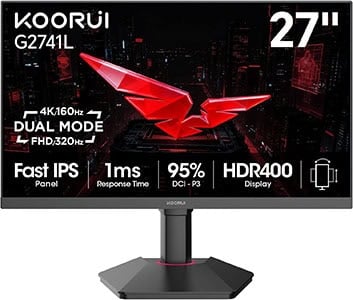
Koorui G2741L
4K 160Hz Dual Mode Monitor
Size: 27”
Resolution: 3840×2160
Panel: IPS
Refresh Rate: 160Hz, 1080p 320Hz
The Pros:
- Wide 95% DCI-P3 color gamut
- Quick response time
- Plenty of features, including VRR up to 320FPS
- High pixel density
- Ergonomic design
The Cons:
- IPS glow and mediocre contrast ratio (as expected from this panel technology)
About The Monitor
Update: We now recommend the KTC H27P6 instead. It offers USB-C 90W PD and KVM for the same price.
The Koorui G2741L is the best 4K monitor you can get under $300, thanks to its Dual Mode and fully ergonomic design.
Image Quality
The 4K UHD resolution on a 27″ sized screens provides you with a high pixel density of 163 PPI (pixels per inch), resulting in incredibly sharp details and text.
The IPS panel also ensures wide viewing angles, a wide 95% DCI-P3 color gamut coverage, a strong 400-nit peak brightness, fast 1ms response time and a typical 1,000:1 contrast ratio.
You can also switch between 4K 160Hz and 1920×1080 320Hz modes for extra motion clarity in fast-paced games. The image at 1080p, of course, won’t look nearly as good as 4K UHD, but this issue isn’t that noticeable in games (in comparison to regular desktop use).
Other features include VRR support for tear-free gameplay up to 160FPS at 4K or 320FPS at 1080p, Dark Level (improves visibility in dark scenes), crosshair overlays, on-screen timers and sRGB, DCI-P3 and Adobe RGB modes.
Design & Connectivity
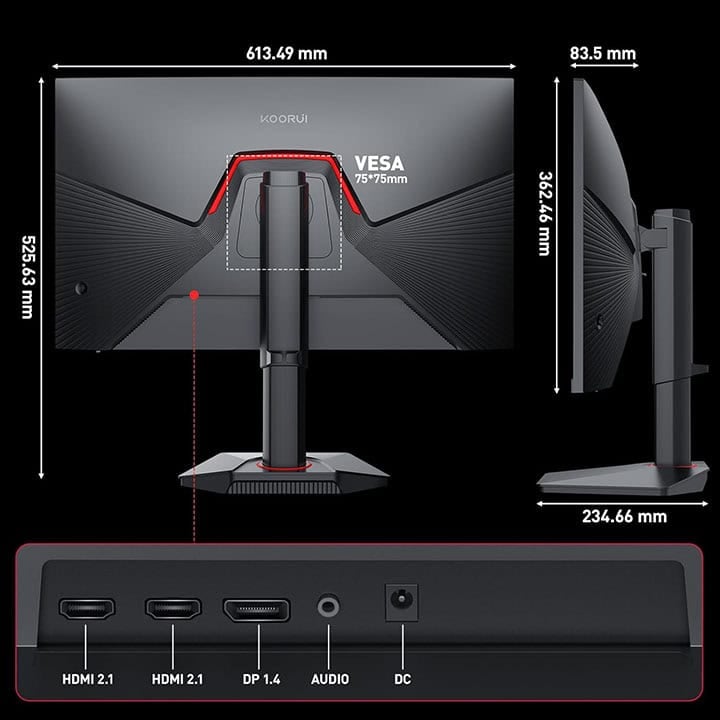
The stand of the monitor offers -5°/20° tilt, +/- 90° swivel, up to 100mm height adjustment and 75x75mm VESA mount compatibility.
Connectivity options include two HDMI 2.1 ports, DP 1.4 and a headphone jack.
Best 32″ 1440p Gaming Monitors
Here are the best 32″ 1440p gaming monitors available with 144Hz or 240Hz, depending on the panel type!

KTC H32S25E
Best Budget 32″ 1440p 240Hz Gaming Monitor
Size: 32”
Resolution: 2560×1440
Panel: VA
Refresh Rate: 240Hz
The Pros:
- High contrast ratio
- Wide 90% DCI-P3 color gamut
- Plenty of features, including VRR up to 240FPS
The Cons:
- Minor ghosting in fast-paced games, mainly in darker scenes
- Tilt-only stand
- Prone to VRR brightness flickering
About The Monitor
You can even find a 32″ 1440p 240Hz high refresh rate VA gaming monitor for under $300, the KTC H32S25E!
Image Quality
The 2560×1440 screen resolution doesn’t look as good on 32″ monitors as it does on 27″ sized screens due to the lower pixel density.
In fact, a 32″ 1440p monitor has the same pixel density as a 24″ 1080p monitor, so you’ll get the same detail clarity, just on a much larger screen and with a bit more screen space due to the higher resolution.
However, since a 32″ display is bigger, you’ll also sit further away from it than you would from a 24″ monitor, meaning that individual pixels won’t be as noticeable (not noticeable at all from ~3ft or ~90cm).
Further, a bigger display improves gaming immersion, but we don’t recommend 32″ monitors for competitive gaming as you’d have to move your eyes/neck a lot to see everything that’s happening on the screen.
The KTC H32S25E has a high contrast ratio for deep blacks and wide coverage of the DCI-P3 gamut (90%) for vibrant colors. It’s also bright with a 350-nit peak brightness and supports HDR10. Since it’s only entry-level HDR support, you shouldn’t pay any attention to it.
Features
AMD FreeSync is supported with a 48-240Hz dynamic range, but some units are affected by VRR brightness flickering.
Just like with most VA monitors at this price range, some smearing is noticeable (mainly in darker scenes). Some users won’t mind it at all or find it tolerable, while other gamers sensitive to it should consider an IPS display instead.
Check out our in-depth KTC H32S25E review for more information.
Design & Connectivity

The design of the monitor includes a steep 1000R curvature, which matches the curvature of the human eye for added immersion, though some people might find that the curvature is too aggressive.
The stand is tilt-only, but the screen is VESA mount compatible via the 100x100mm pattern.
Connectivity options include two DisplayPort 1.4 ports, two HDMI 2.0 ports (max 144Hz at 1440p), a headphone jack and a USB hub for service and firmware updates.
Alternatives
If you want a cheaper model with a lower refresh rate, check out the Koorui 32E6QC.
Best 1080p Gaming Monitors
For the highest frame rate, lowest input lag and smoothest performance in the eSports titles, a lower screen resolution is preferred because it’s a lot less taxing on your CPU/GPU.

ViewSonic XG2431
240Hz Gaming Monitor Under $300
Size: 23.8”
Resolution: 1920×1080
Panel: IPS
Refresh Rate: 240Hz
VRR: FreeSync (G-SYNC Stable)
The Pros:
- Plenty of features, including FreeSync up to 240Hz
- Quick response time
- Fully ergonomic design, USB hub
- Impeccable MBR implementation
The Cons:
- IPS glow and mediocre contrast ratio (as expected from this panel technology)
About The Monitor
The ViewSonic XG2431 is actually one of the cheapest 240Hz monitors you can get, yet it offers flawless VRR performance, an impeccable MBR implementation and an IPS panel for vibrant colors!
Image Quality
As far as the picture quality is concerned, you get the same viewing experience as with the standard 24″ 1080p IPS panels.
This includes a 1,000:1 contrast ratio, a 400-nit peak brightness, wide viewing angles, 8-bit color depth support and 99% sRGB color gamut coverage.
The 1080p resolution provides a decent pixel-per-inch ratio on the 23.8″ viewable screen of the monitor. More importantly, it allows you to easily reach high frame rates in the eSports titles.
Features
The ViewSonic XG2431 offers smooth VRR performance and a backlight strobing feature fine-tuned by Blur Busters for CRT-like motion clarity.
Other useful features include Black Stabilization (improves visibility in darker games) and various picture presets.
Check out our ViewSonic XG2431 review for more information.
Design & Connectivity
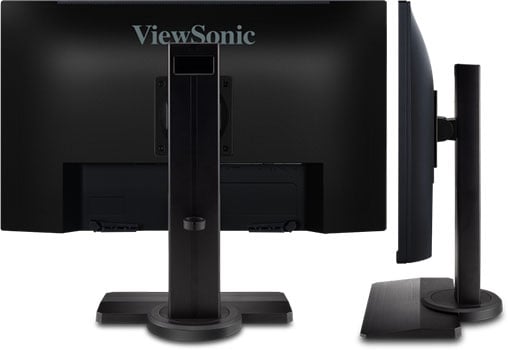
The XG2431 240Hz monitor features a fully ergonomic design with up to 120mm height adjustment, -5°/15° tilt, +/- 90° swivel, 90° rotation and 100x100mm VESA mount compatibility.
Connectivity options include two HDMI 2.0 ports, DisplayPort 1.4, a headphone jack, dual 3W speakers and a dual-USB 3.0 hub. FreeSync is supported over both HDMI 2.0 and DisplayPort 1.4 with a 48-240Hz variable refresh rate range.

ASUS XG259CMS
1080p 310Hz Gaming Monitor
Size: 24.5”
Resolution: 1920×1080
Panel: IPS
Refresh Rate: 310Hz
VRR: FreeSync (G-SYNC Compatible)
The Pros:
- Plenty of features, including VRR + MBR up to 310Hz
- Quick response time
- Fully ergonomic design
The Cons:
- IPS glow and mediocre contrast ratio (as expected from this panel technology)
About The Monitor
In case the ViewSonic XG2431 is not available or you’re not interested in MBR, the ASUS XG259CMS is an excellent alternative.
Image Quality
The ASUS XG259CMS has a slightly larger 24.5″ IPS screen, but the image quality will be largely identical with the same 400-nit peak brightness, 1,000:1 contrast ratio, and a tad wider 110% sRGB color gamut.
However, the XG259CMS goes up to 310Hz for a subtle boost in motion clarity. It also supports MBR via ASUS ELMB-Sync implementation (allows for simultaneous VRR and MBR performance) up to 310FPS.
ELMB-Sync isn’t as effective or customizable as PureXP of the XG2431 and there’s more crosstalk at lower refresh rates.
So, the choice between the two will mainly come down to what frame rate you can maintain in games. For capped 120FPS, go with the XG2431. If you can maintain a higher frame rate closer to 310FPS, go with the XG259CMS.
You also get other typical gaming features, such as on-screen timers, crosshairs, a refresh rate tracker and Shadow Boost (improves visibility in dark scenes).
Design & Connectivity
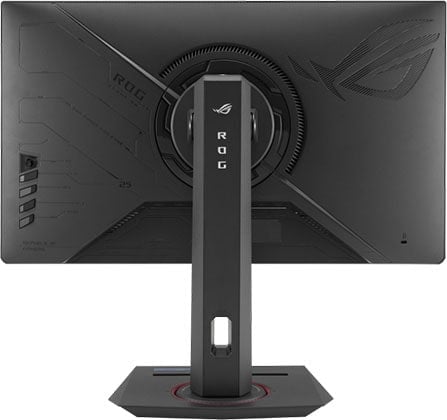
The stand of the monitor offers height adjustment up to 120mm, +/- 45°, +/- 90° pivot, -5°/20° tilt and 100x100mm VESA mount compatibility.
Connectivity options include DP 1.4, HDMI 2.0, USB-C (DP Alt Mode and 7.5W PD) and a headphone jack.
Alternatives
If you want a monitor with a higher 360Hz refresh rate, you might be able to find the Dell Alienware AW2523HF on sale for $280, though it doesn’t have MBR support.
Best UltraWide Monitors
For under $300, you can also get a nice ultrawide monitor. These monitors feature a 21:9 aspect ratio instead of the standard 16:9, which means that they are shorter but a lot wider and thus provide a more cinematic and immersive viewing experience.
Make sure your favorite games support the 21:9 format! For more ultrawide displays, visit our best ultrawide monitor buyer’s guide.

KTC H34S18S
34″ 3440×1440 Curved UltraWide Monitor Under $300
Size: 34”
Resolution: 3440×1440
Panel: VA
Refresh Rate: 165Hz
The Pros:
- Wide 90% DCI-P3 color gamut
- High contrast ratio
- Plenty of features, including VRR and MBR up to 165FPS
- Ergonomic design
The Cons:
- Minor ghosting in fast-paced games, mainly in dark scenes
- Prone to VRR brightness flickering
About The Monitor
Nowadays, you can even find a 34″ 3440×1440 ultrawide monitor for under $300!
Image Quality
If you want a larger 34″ ultrawide monitor for under $300, there are a few low refresh rate 2560×1080 models with low pixel density, but the KTC H34S18S is available with 3440×1440!
The 34″ 3440×1440 screen provides you with a high pixel density of 110 PPI. So, it’s essentially a 27″ 2560×1440 display that’s just ~33% wider, providing you with a lot of screen space and sharp details.
It has a VA panel with a high 4,000:1 contrast ratio for deep blacks, a strong 350-nit peak brightness and a wide 91% DCI-P3 color gamut coverage (~130% sRGB).
VRR is supported up to 165Hz for tear-free gameplay, as well as MBR – and you get Picture by Picture / Picture in Picture support.
Check out our in-depth KTC H34S18S review for more details.
Design & Connectivity

The stand of the monitor offers a good range of ergonomics, including up to 90mm height adjustment, +/- 20° swivel, +/- 5° pivot, -5°/20° tilt and 100x100mm VESA mount compatibility. The screen has a moderate 1500R curvature for added immersion.
Connectivity options include 2x HDMI 2.0 ports, 2x DisplayPort 1.4 ports, a headphone jack and a USB port for service and firmware updates.
Alternatives
You can also find similar 34″ 3440×1440 high refresh rate curved VA models without a wide color gamut at a lower price ($250 – $300):
- Aopen 34HC5CURP
- LG 34GP63A
- LG 34WP60C – tilt-only version of the 34GP63A
There are a few good alternatives with a wide color gamut available as well:
Sceptre E345B-QUN168W
34″ 3440×1440 IPS UltraWide Monitor Under $300
Size: 34”
Resolution: 3440×1440
Panel: IPS
Refresh Rate: 144Hz
The Pros:
- Wide 95% DCI-P3 color gamut
- Quick response time
- Plenty of features, including VRR and MBR up to 144FPS
- Ergonomic design, USB hub, integrated speakers
The Cons:
- IPS glow and mediocre contrast ratio (as expected from this panel technology)
- Flat screen, not curved
About The Monitor
In case you’d rather have a 34″ 3440×1440 ultrawide monitor with an IPS panel and faster response time than the high contrast ratio of the C345B-QUT168, the Sceptre E345B-QUN168W offers excellent value for money.
Image Quality
The monitor has a strong peak brightness of 400-nits, a static contrast ratio of 1,000:1 and a wide 95% DCI-P3 color gamut coverage.
So, you get a quick response time speed for no ghosting, smooth VRR performance, a wider color gamut and wider viewing angles, but blacks won’t be as deep.
Further, the Sceptre E345B-QUN168W has a flat screen, whereas most users prefer curved models with this form factor.
Sadly, the cheapest 34″ 3440×1440 high refresh rate curved ultrawide monitor with an IPS panel goes for at least $450, which is the Acer XR343CKP.
Design & Connectivity

The stand of the monitor offers height adjustment up to 100mm, tilt by -5°/15°, +/- 15° swivel and 100x100mm VESA mount compatibility.
Connectivity options include DisplayPort 1.4, three HDMI 2.0 inputs (limited to 100Hz), USB-C (with DP Alt Mode, also limited to 100Hz), a headphone jack, dual 3W integrated speakers and a USB 3.0 hub (3 downstream + 1 upstream).
Conclusion
There you have it! These are the absolute best gaming monitors under $300 you can get right now. We’ve carefully selected only the best models and made sure that you have a wide selection.
For competitive gamers out there, the ViewSonic XG2431 will deliver the best results, granted that you can push ~240FPS. If you prefer lower input lag to motion clarity, go with the ASUS XG259CMS instead if you can reach ~310FPS.
In case you’re after something a bit different, we recommend the Sceptre E345B-QUN168W for fast-paced games and the KTC H34S18S for graphically-oriented games, while both are excellent for productivity work and basic content creation.
For HDR, you should definitely get the AOC Q27G40XMN or the KTC M27T6.
Still not sure what monitor to get?
Let us know in the comments below, and we’ll gladly help!
Updates +
- February 14, 2026:
– Replaced the Koorui G2741L with the KTC H27P6. Review summary will be updated soon. - February 9, 2026:
– Added review summaries for the ASUS XG259CMS, the Koorui G2741L and the KTC M27T6. - November 21, 2025:
– Added the Innocn 25M2S, the Koorui G2741L and the ASUS XG259CMS to the table. Review summaries will be added soon.
– Removed the Titan Army P2510S and the KTC H27E22. - July 9, 2025:
– Added the KTC M27T6 to the table. - May 23, 2025:
– Repalced the AOC Q27G3XMN with the AOC Q27G40XMN.
– Replaced the Gigabyte GS27Q-X with the KTC H27E6.
– Removed the Innocn 27M2U-D and the Sceptre E325B-QPN168. - November 23, 2024:
– Added a review summary for the Titan Army P2510S.
– Added the KTC H32S25E.
– Replaced the Innocn 27G1S with the KTC H27E22.
– Removed the Gigabyte M32QC and the Aopen 25XV2QF. - September 16, 2024:
– Added the Titan Army P2510S to the table. A review summary will be added soon. - June 25, 2024:
– Replaced the HP Omen 27qs with the Gigabyte GS27Q-X.
– Added the Innocn 27M2U-D. - April 18, 2024:
– Replace the Sceptre C345B-QUT168 with the KTC H34S18S. - November 13, 2023:
– Added a review summary for the AOC Q27G3XMN.
– Removed the AOC CQ27G3S, the Acer XV272UV, the Sceptre C305B-200UN, the MSI MAG301RF, the Philips 278E1A and the LG 32UN500.
– Replaced the Samsung S34J550W with the Sceptre C345B-QUT168, and the Sceptre E345W-QUT with the E345B-QUN168W model. - April 18, 2023:
– Replaced the LG 32UL500 with the LG 32UN500. - December 2, 2022:
– Added review summaries for the Sceptre E345W-QUT and the Acer Aopen 25XV2QF. - November 23, 2022:
– Replaced the AOC CQ27G2 with the AOC CQ27G3S, the MSI G273QF with the Acer XV272UV and the Dell S2522HG with the ViewSonic XG2431. - June 24, 2022:
– Removed the ASUS PA278QV and the LG 29WP60G.
– Added the Gigabyte M32QC, the Samsung S34J550W and the LG 32UN500.
– Replaced the Acer XV272UP with the MSI G273QF. - February 22, 2022:
– Replaced the LG 29WK600 with the LG 29WP60G. - December 13, 2021:
– Added review summaries for the monitors that were missing them. - November 26, 2021:
– Checked up on the guide to ensure that our picks are still the best options available. - August 12, 2021:
– Replaced the ViewSonic VX2758-2KP-MHD with Gigabyte G27Q and the Acer XF250Q with Dell S2522HG.
– Removed the BenQ EX2510.
– Added the MSI MAG301RF to the table. A Dedicated review section for it will be added soon to the article. - February 11, 2021:
– Added the ViewSonic VX2758-2KP-MHD.


