
Ever since Samsung surprised us with their 49″ CHG90 display back in 2017, 32:9 ultrawide (also referred to as super-ultrawide) monitors have been getting even more exciting and popular each year.
In this guide, we’ll fill you in on all the best 32:9 ultrawide monitors for gaming, work and everything in between!
| Monitor | Size | Resolution | Panel | Refresh Rate | |
|---|---|---|---|---|---|
| 45” | 5120x1440 | VA | 200Hz | ||
| 49” | 5120x1440 | VA | 120Hz | ||
| 49” | 5120x1440 | IPS | 144Hz | ||
| 49” | 5120x1440 | VA | 240Hz | ||
| 49” | 5120x1440 | VA | 240Hz | ||
| 57” | 7680x2160 | VA | 240Hz | ||
| 49” | 5120x1440 | OLED | 240Hz |


MSI MPG 491CQPX

- Infinite contrast ratio
- 49″ 5120×1440 240Hz
- Instantaneous response time

Samsung Odyssey Neo G95NC

- 2392-zone mini LED FALD
- 57″ 7680×2160 240Hz
- Fast response time
Nowadays, there are quite a few excellent 32:9 ultrawide monitors to choose from!
Check out our review summaries below to ensure you’re getting the model that’s most suited to your budget and personal preference.
We’ll help you decide which panel type, resolution, refresh rate and features are right for you.
If you’re looking for a 21:9 ultrawide monitor, we also have a dedicated buyer’s guide for that!
You can also view our changelogs for this particular buying guide at the end of this article.

LG 45GR65DC
Budget 1440p 32:9 UltraWide Gaming Monitor
Size: 45”
Resolution: 5120×1440
Panel: VA
Refresh Rate: 200Hz
The Pros:
- Wide color gamut
- High contrast ratio
- Plenty of features, including VRR up to 200Hz
- Ergonomic stand
The Cons:
- Minor ghosting (mainly in dark scenes)
- Prone to VRR brightness flickering
About The Monitor
In case you want a super-ultrawide monitor with a higher 5120×1440 resolution, the LG 45GR65DC is the most affordable option with a high 200Hz refresh rate!
Image Quality
The LG 45GR65DC is basically equivalent to two 24.5″ 2560×1440 displays side by side (without the bezels between them). So, for a lot of users, the monitor might appear too wide for its height, but it just takes some time to get used to.
The good news is that you get a high pixel density of 119 PPI (pixels per inch), resulting in sharp details and text.
It also boasts a fast 1ms GtG pixel response time speed, but some ghosting will be noticeable behind fast-moving objects in dark scenes.
Further, while VRR is supported up to 200FPS for tear-free gameplay, VRR brightness flickering can be detected in games with fluctuating frame rates and in in-game menus or loading screens.
The LG 45GR65DC has a high 3,000:1 static contrast ratio for deep blacks, a strong 400-nit peak brightness and a wide 95% DCI-P3 gamut coverage for vibrant colors.
HDR is supported as well with a boost in peak brightness up to 600-nits, but since the monitor lacks full-array local dimming, you won’t be getting a proper HDR viewing experience.
Design & Connectivity

The monitor’s stand is robust and offers height adjustment up to 120mm, tilt by -5°/15° and +/- 15° swivel, while the screen has a moderate 1800R curvature for added immersion and 100x100mm VESA mount compatibility.
Connectivity options include two HDMI 2.0 ports, DP 1.4, mini-DP 1.4, a headphone jack, a microphone jack and a dual-USB 3.0 hub.
Alternatives
- LG 45GR75DC – same monitor but with a built-in KVM switch and USB-C port (DP Alt Mode and 90W Power Delivery) for ~$100 more
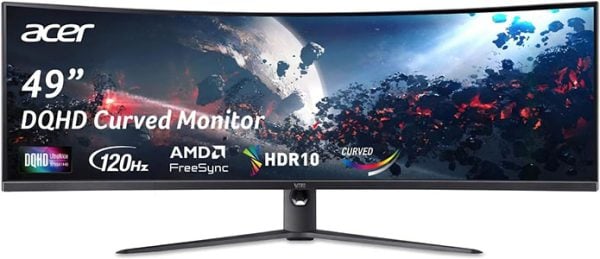
Acer EI491CUR J0
Best VA 32:9 UltraWide Monitor For Mixed Use
Size: 49”
Resolution: 5120×1440
Panel: VA
Refresh Rate: 120Hz
The Pros:
- Wide color gamut
- High contrast ratio
- Plenty of features, including VRR up to 120Hz
- Ergonomic stand
The Cons:
- Minor ghosting (mainly in dark scenes)
- Prone to VRR brightness flickering
About The Monitor
Now, if you want a 49″ 5120×1440 super-ultrawide monitor for either work or gaming (or both), the Acer EI491CUR J0 is the best value model available!
Image Quality
With a 5120×1440 resolution on a 49″ screen, you get a high pixel density of roughly 109 PPI for sharp details and text, as well as plenty of screen real estate.
Further, the monitor has a wide 90% DCI-P3 color gamut, a decent 300-nit peak brightness and a high 3000:1 static contrast ratio for immersive image quality.
However, it uses an older VA panel with a slow pixel response time and it’s prone to VRR brightness flickering, though it has a high 120Hz maximum refresh rate for smooth motion clarity.
Given that the main attraction of these super-ultrawide displays is immersion rather than responsiveness, a lot of gamers won’t mind the smearing behind fast-moving objects in dark scenes. Still, if you’re particularly sensitive to this, there are faster models available.
Design & Connectivity
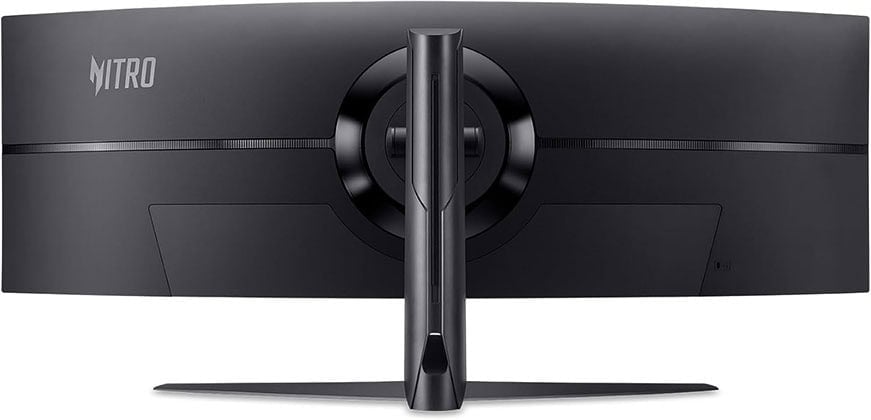
The stand of the monitor is sturdy and offers height adjustment up to 130mm, -5°/20° tilt and 100x100mm VESA mount compatibility. The screen has a steep 1000R curvature for added immersion.
Connectivity options include DisplayPort 1.4, two HDMI 2.0 ports (max 75Hz) and a headphone jack.
Alternatives
- Samsung S95UC – a model with RJ45 and USB-C with 90W Power Delivery (100Hz over USB-C)

LG 49WQ95C
Best IPS 32:9 UltraWide Monitor For Mixed Use
Size: 49”
Resolution: 5120×1440
Panel: IPS
Refresh Rate: 144Hz
The Pros:
- Quick response time speed
- Wide color gamut
- Plenty of features, including VRR up to 144Hz
- Ergonomic stand and rich connectivity options, including USB-C with 90W PD and KVM
The Cons:
- IPS glow and mediocre contrast ratio (as expected from this panel technology)
About The Monitor
The LG 49WQ95C is the best 49″ super-ultrawide monitor with an IPS panel, however, its price ranges from $1,000 all the way up to $1,700. So, in case it’s not on sale, we highly recommend waiting for a price drop.
Image Quality
The monitor uses an IPS panel with a wide 98% DCI-P3 gamut coverage, delivering the most vibrant colors out of all 32:9 ultrawide displays available!
It doesn’t have as high contrast ratio as VA models at 1,000:1, so blacks won’t be as deep, but you get a decent peak brightness of 400-nits.
Another big advantage of the LG 49WQ95C is its fast pixel response time speed, which will prevent noticeable ghosting behind fast-moving objects. There’s also no dark-level smearing in dark scenes!
Additionally, unlike VA monitors, the 49WQ95C offers flawless VRR performance without any tearing, stuttering or flickering with official AMD FreeSync Premium Pro and NVIDIA G-SYNC Compatible certifications.
IPS panels also have more consistent colors than VA technology, so the monitor is perfect for professional color-critical work.
Check out our full LG 49WQ95C review for more information.
Design & Connectivity

The stand is robust and offers height adjustment up to 110mm, -5°/20° tilt, +/- 15° swivel and 100x100mm VESA mount compatibility, while the screen has a subtle 3800R curvature for added immersion without distorting the image.
Connectivity options include two HDMI 2.1 ports, DP 1.4 with DSC, USB-C with DP 1.4 Alt Mode and 90W PD, a dual-USB 3.0 hub, a headphone jack and dual 10W built-in speakers. There’s also an integrated KVM functionality along with PiP and PbP support.
Alternatives
LG plans to release a new version of this monitor with the same specifications, the LG 49U950A. Choose whichever is cheaper.
There are a few 49″ 5120×1440 60Hz IPS super-ultrawide monitors available, such as the Dell U4919DW and the LG 49WL95C-WE (and the 49WL95C-WY variant – it’s the same monitor, just a revision).
Now, these three models can be found for $900 – $1400 yet they don’t have as wide color gamut nor as high refresh rate as the LG 49WQ95C. So, if you can get the 49WQ95C on sale for $1,000, it definitely offers the best value for money.
At its highest $1,700 price, however, it’s rather expensive and worth considering only if you really want a single monitor for both gaming and professional color-critical work.

Samsung G95C
Best 32:9 UltraWide Gaming Monitor
Size: 49”
Resolution: 5120×1440
Panel: VA
Refresh Rate: 240Hz
The Pros:
- Quick response time speed
- Wide color gamut, high contrast ratio
- Plenty of features, including VRR up to 240Hz
- Ergonomic stand and rich connectivity options
The Cons:
- Prone to VRR brightness flicker
About The Monitor
If you want a super-ultrawide monitor for gaming first, the Samsung Odyssey G95C offers the best value for money!
Image Quality
Even though it has a VA panel, the Samsung G9 actually has a faster pixel response time speed than the LG 49WQ95C, as well as a higher 240Hz refresh rate for a more responsive gaming experience.
On top of that, it maintains a high 2,500:1 static contrast ratio for deep blacks, a wide 95% DCI-P3 gamut coverage for vibrant colors, and has semi-HDR support with a peak brightness of 1,000-nits, albeit with only 10 edge-lit dimming zones.
So, some HDR scenes will look better than SDR, but you’re not getting the true HDR viewing experience.
Next, it boasts AMD FreeSync Premium Pro certification for tear-free gameplay up to 240FPS, but some units still might exhibit occasional brightness flickering. There’s the VRR Control option in the OSD menu, but as we’ve mentioned before, it can replace brightness flickering with micro-stutter.
Still, screen tearing is hardly noticeable at 240Hz, so you might want to just disable VRR in games where VRR Control on/off doesn’t help.
Design & Connectivity

The design of the monitor includes a steep 1000R curvature for added immersion and RGB lighting at the back of the monitor.
You can elevate the screen up to 120mm, tilt it by -5°/15°, swivel by +/- 15°, or VESA mount it (100x100mm).
Connectivity options include DisplayPort 1.4, two HDMI 2.1 ports, a headphone jack and a dual-USB 3.0 hub.
Alternatives
The Odyssey G9 goes for ~$800 – $1,000. There’s also the older Odyssey C49G95T model with a lighter design and HDMI 2.0 that goes for the same price.
So, pick whichever is cheaper. LG also offers a model based on the same panel, the LG 49GR85DC, but it doesn’t have as good overdrive implementation due to minor black smearing.
- ASUS XG49WCR – a lower 165Hz refresh rate and slower response time. It has a USB-C port with 90W PD, KVM and a $800 price.

Samsung Neo G95NA
Best 32:9 UltraWide HDR Gaming Monitor
Size: 49”
Resolution: 5120×1440
Panel: VA
Refresh Rate: 240Hz
The Pros:
- True HDR image quality
- Quick response time speed
- Wide color gamut, high contrast ratio
- Plenty of features, including VRR up to 240Hz
- Ergonomic stand and rich connectivity options
The Cons:
- Prone to VRR brightness flicker
About The Monitor
The Samsung Odyssey Neo G9 is basically a beefier version of the previous model with proper HDR support!
Image Quality
You get the same 49″ 5120×1440 240Hz 1000R curved VA panel with a high 2,500:1 contrast ratio, 95% DCI-P3 color gamut, rapid response time speed and punchy 1,000-nit peak brightness.
However, instead of a measly 10-zone edge-lit local dimming system, the Neo G9 has a 2048-zone mini LED FALD (full-array local dimming) backlight for a proper HDR viewing experience!
These zones dim parts of the image that are supposed to be dark without affecting areas that are supposed to remain bright, thus drastically increasing the contrast ratio.
As a result, you simultaneously get bright highlights and deep blacks with vibrant colors, while the giant screen wraps around your peripheral vision for an exceptional viewing and gaming experience.
FALD can cause some blooming when illuminating small bright objects surrounded by dimmed zones, but it’s only visible in extreme scenarios.
Visit our full Samsung S49AG95 review for more information. Note that the G95NA can be found on sale for ~$1,250, so we don’t recommend paying more than that for it.
Design & Connectivity

The stand of the monitor offers height adjustment up to 120mm, tilt by -5°/15°, +/- 15° swivel and 100x100mm VESA mount compatibility.
Connectivity options include DP 1.4 with DSC, two HDMI 2.1 ports, a headphone jack and a dual-USB 3.0 hub.
Samsung Neo G95NC
Best 32:9 UltraWide HDR Gaming Monitor
Size: 57”
Resolution: 7680×2160
Panel: VA
Refresh Rate: 240Hz
The Pros:
- True HDR image quality
- Quick response time speed
- Wide color gamut, high contrast ratio
- Plenty of features, including VRR up to 240Hz
- Ergonomic stand and rich connectivity options
The Cons:
- Expensive
- Noticeable blooming in some scenes
- Prone to VRR brightness flicker
About The Monitor
The Samsung Neo G95NC is a bigger version of the G95NA, with a higher resolution to back it up.
Image Quality
While you can look at the G95NA as two 27″ 2560×1440 displays side by side, the G95NC is equivalent to two 32″ 4K UHD displays next to each other without the bezels in between.
So, you get a high pixel density of roughly 140 PPI for sharp details and text, while the big super-ultrawide display ensures immersive gameplay.
Note that the RTX 40-series GPUs don’t support the maximum resolution of this monitor – they’re limited to 120Hz at 7680×2160, whereas AMD’s 7000-series cards support 240Hz.
However, even with the RTX 4090, you won’t be able to get over 120FPS at 7680×2160 with decent picture settings in most games. So, you can think of this monitor as an investment for your future GPU upgrades.
In terms of HDR image quality, you get 2392 dimming zones for excellent backlight control, a 1300-nit peak brightness for stellar highlights and a wide 95% DCI gamut coverage for vibrant colors.
VRR is supported up to 240Hz for tear-free gameplay and the monitor’s rapid 1ms GtG pixel response time speed ensures that there’s no ghosting behind fast-moving objects.
Check out our full G95NC review for more information.
Note that the G95NC can be found on sale for ~$1,700.
Design & Connectivity

The stand of the monitor offers height adjustment up to 120mm, -5°/12° tilt, +/- 15° swivel and 100x100mm VESA mount compatibility. There’s also a steep 1000R screen curvature for added immersion.
Connectivity options include DisplayPort 2.1, three HDMI 2.1 ports, a headphone jack, two USB-A and two USB-B ports for the built-in KVM.
MSI MPG 491CQPX
Best 32:9 UltraWide OLED Gaming Monitor
Size: 49”
Resolution: 5120×1440
Panel: OLED
Refresh Rate: 240Hz
The Pros:
- True HDR image quality
- Instantaneous response time, infinite contrast ratio
- Wide color gamut
- Plenty of features, including VRR up to 240Hz
- Ergonomic stand and rich connectivity options, including KVM and USB-C with 90W PD
The Cons:
- Risk of burn-in
- Prone to VRR brightness flicker
About The Monitor
If you don’t want to deal with the blooming/haloing of FALD displays, you should get an OLED super-ultrawide gaming monitor!
Image Quality
The MSI MPG 491CQPX monitor uses Samsung’s QD-OLED panel, which has a lower brightness than the G95NC and G95NA models (250-nits 100% white window peak, 1000-nits for <3% small highlights), but it has an infinite contrast ratio since each pixel can be individually turned off for true blacks.
You also get an exceptional 99% DCI-P3 color gamut coverage and true 10-bit color depth support. Other advantages of OLED technology include impeccable viewing angles and an instantaneous pixel response time for zero ghosting behind fast-moving objects. VRR is supported up to 240Hz for tear-free gameplay.
OLED gaming monitors usually have issues with small text and fine detail clarity, but the MSI MPG 491CQPX uses a second-gen QD-OLED panel, so this issue is minimized and won’t bother most users.
The main disadvantage of OLEDs is the risk of permanent image burn-in when viewing an image with bright static elements for too long. However, many integrated features prevent this and as long as you’re using the screen sensibly, it won’t be an issue.
Design & Connectivity

The stand of the monitor offers height adjustment up to 100mm, +/- 30° swivel, -5°/20° tilt and 100x100mm VESA mount compatibility.
It uses the same screen coating as other QD-OLED panels, meaning that the image is more vivid, but also more reflective, and it has a moderate 1800R screen curvature for extra immersion.
Connectivity options include two HDMI 2.1 ports, DisplayPort 1.4 with DSC, USB-C with DP Alt Mode and 98W PD, a dual-USB 3.0 hub and a headphone jack.
Alternatives
- MSI MPG 491CQP – the cheaper model with 144Hz
- Samsung OLED G9 – Samsung’s model that’s usually more expensive yet doesn’t have USB-C or KVM
Conclusion
Did you find the best 32:9 ultrawide monitor for you? The prices of these monitors can be all over the place, so if you’re unsure which one is perfect for you, hit us up in the comments below!
Overall, we find that the MSI MPG 491CQPX offers the best value for the price thanks to its QD-OLED panel and a high 240Hz refresh rate.
If you’re too worried about burn-in or prefer a brighter image to an infinite contrast ratio, the Samsung G95NA or G95NC are for you, depending on your budget.
In case you have a more limited budget, the remaining SDR models will most likely satisfy you as well for the money paid thanks to the wow effect of super-ultrawide models.
We recommend the LG 49WQ95C if you want stable VRR performance with accurate and consistent colors, fit for color-critical work. If you don’t mind screen tearing and would rather have a high contrast ratio, the Samsung G95C is for you.
Updates +
- February 13, 2026:
– Removed the Sceptre E448B-FSN168, the Samsung CHG90, and the AOC AG493UCX2.
– Added the Acer Nitro EI491CUR J0biiphx. - November 26, 2025:
– Checked up on the guide to ensure that our picks are still the best options available. - April 13, 2025:
– Checked up on the guide to ensure that our picks are still the best options available. - January 16, 2025:
– Replaced the Samsung OLED G9 with the MSI MPG 491CQPX. - November 22, 2024:
– Checked up on the guide to ensure that our picks are still the best options available. - July 22, 2024:
– Added the LG 45GR65DC.
– Replaced the Samsung G9 with the newer G95C model.


