
So, you want a large monitor for gaming, videos, work, or everyday use, but you’re not sure which model to opt for or what specifications are the right ones for you?
We can help you out with that!
In this buying guide, you’ll find all the best 32-inch monitors currently available as well as everything you need to look out for when purchasing a display of this size!
| Type | Monitor | Panel | Resolution | Refresh Rate | |
|---|---|---|---|---|---|
| Best 32-inch Budget Monitors | IPS | 1920x1080 | 75Hz | ||
| VA | 1920x1080 | 100Hz | |||
| Best 32-inch 4K 60Hz Monitor | VA | 3840x2160 | 60Hz | ||
| Best 32-inch 1440p Gaming Monitors | VA | 2560x1440 | 170Hz | ||
| VA | 2560x1440 | 170Hz | |||
| VA | 2560x1440 | 240Hz | |||
| Best 32-inch HDR Monitors | IPS | 3840x2160 | 4K 160Hz, 1080p 320Hz | ||
| OLED | 3840x2160 | 240Hz | |||
| OLED | 3840x2160 | 4K 240Hz, 1080p 480Hz |

MSI MPG 321URX

- 4K 240Hz
- Infinite contrast, instant response times
- USB-C / KVM

Acer XV325QK V3

- 4K 160Hz IPS (1080p 320Hz)
- 1152-zone mini LED FALD

Koorui 32E6QC
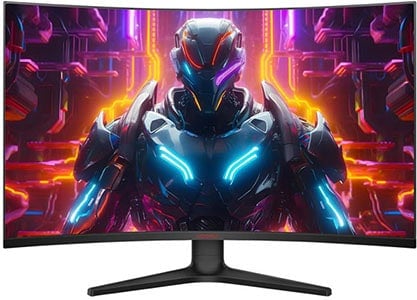
- Affordable 1440p monitor
- 170Hz
- High contrast ratio
If you want to view our changelogs for this particular buying guide, you can do so at the end of this article.
Best Budget 32-inch Monitors
Keep in mind that 32″ monitors with 1920×1080 resolution have a rather low pixel-per-inch ratio (pixel density), which causes the picture quality to be pixelated. So, we don’t recommend this combination for regular desktop use.
However, when looking at the screen from a distance, the individual pixels won’t be as noticeable. So, if you just want a big monitor for console gaming, watching videos and similar use, 32″ 1080p monitors can be useful for that.

ViewSonic VA3209M
32″ 1080p IPS On a Budget
Panel: IPS
Resolution: 1920×1080
Refresh Rate: 75Hz
The Pros:
- Inexpensive
- Precise and consistent colors
- VRR up to 75Hz
- Wide viewing angles
The Cons:
- Not ideal for regular desktop use due to low pixel density
- Tilt-only stand
- IPS glow and mediocre contrast ratio (as expected from this panel technology)
About The Monitor
The ViewSonic VA3209M is one of the most budget-friendly 32″ 1080p monitors you can get, yet it features an IPS panel for wide viewing angles and a 75Hz refresh rate.
Image Quality
Thanks to its IPS panel, the colors will be consistent across the entire screen, and with the wide 178° viewing angles, the picture won’t change in color, contrast, or brightness when you look at the monitor off-axis.
Further, it has a peak brightness of only 250-nits and a static contrast ratio of 1,200:1, which is standard for a monitor in this price range.
Lastly, the ViewSonic VA3209M has a quick pixel response time and low input lag, so it’s great for console gaming as you’ll get no prominent motion blur or perceptible delays.
It supports VRR (variable refresh rate) for tear-free gameplay up to 75Hz, but since it doesn’t have a DisplayPort input, you won’t be able to use VRR with NVIDIA GPUs.
You also get plenty of other useful features, such as Black Stabilization (improves visibility in dark scenes), automatic input switch, aspect ratio control, sharpness adjustment, etc.
Design & Connectivity

The stand of the monitor is tilt-only, but the screen is VESA mount compatible via the 100x100mm pattern.
Connectivity options include HDMI 1.4, VGA, a headphone jack and dual 2.5W integrated speakers.
Alternatives
- LG 32ML600M – a more expensive model with a wider color gamut and ‘fake’ HDR support, but no integrated speakers, VRR or 75Hz
- LG 32SR50F – a more expensive $230 model with built-in smartOS and a remote controller

LG 32MR50C
100Hz On A Budget
Panel: VA
Resolution: 1920×1080
Refresh Rate: 100Hz
The Pros:
- High contrast ratio
- 100Hz refresh rate
- Plenty of features, including AMD FreeSync
The Cons:
- Not ideal for regular desktop use due to low pixel density
- No DisplayPort input
- Tilt-only stand
About The Monitor
If you’d rather have a 32″ 1080p monitor with a curved screen and/or a VA panel, the LG 32MR50C is the most affordable option yet it also has a high 100Hz refresh rate!
Image Quality
The LG 32MR50C uses a VA panel with a steep 1000R curvature for added immersion. Further, it has a high 3,000:1 contrast ratio, which results in noticeably deeper blacks as opposed to that of IPS panels.
However, the LG 32MR50C doesn’t have as wide viewing angles as IPS panels.
The LG 32MR50C has one more advantage though, which is the 100Hz refresh rate that provides you with noticeably smoother motion. In fact, we find that the difference between 100Hz and 60-75Hz is more noticeable than the difference between 100Hz and 144Hz.
It also supports variable refresh rate for tear-free gameplay up to 100Hz, however, since it doesn’t have a DisplayPort input (or HDMI 2.1), VRR only works with AMD Radeon cards.
Design & Connectivity

The stand of the monitor is tilt-only, but the screen is VESA mount compatible via the 100x100mm pattern.
Connectivity options include two HDMI 1.4 ports, VGA and a headphone jack.
Alternatives
You should also consider the Samsung M50D – it’s a 32″ 1080p monitor with a VA panel and built-in smart features. We’ll cover these smart models a bit further down the article.
Best 4K 60Hz Monitors
If you’re just looking for a basic 32″ 4K display with a low refresh rate, here are the most cost-efficient models.

KTC A32Q8
32″ 4K VA Smart Monitor With USB-C
Panel: VA
Resolution: 3840×2160
Refresh Rate: 60Hz
The Pros:
- High contrast ratio
- Built-in smart features
- USB-C with DP Alt Mode and 65W PD
The Cons:
- Tilt-only stand
About The Monitor
The KTC A32Q8 is the most affordable 32″ 4K 60Hz display, yet it features built-in Google TV smart OS.
Image Quality
The KTC A32Q8 is a 32″ 4K monitor based on a VA panel, delivering a high 3,000:1 static contrast ratio for deep blacks. It has a 250-nit peak brightness, basic HDR10 support and a ~83% DCI-P3 color gamut coverage.
It features Google TV smart OS and comes with a remote controller for responsive navigation.
Check out our in-depth KTC A32Q8 review for more details.
Design & Connectivity

The stand of the monitor is tilt-only, but it’s VESA mount compatible. The monitor also has WiFi and Bluetooth support.
Connectivity options include HDMI 2.0, DP 1.4, a USB-C port with DisplayPort Alternate Mode and 65W Power Delivery, allowing you to charge a compatible laptop, four downstream USB-A ports, a headphone jack and integrated speakers.
Alternatives
- LG 32SQ730S – LG’s smart monitor with WebOS instead of Google TV. It has a height-adjustable stand, RJ45 and VRR support, but it can be up to $200 more expensive.
- Samsung M70D – Samsung’s monitor with Tizen OS, can be found on sale for $330 but lacks VRR support
- Samsung M80D – Based on the same panel as the M70D, but features an ergonomic stand and a built-in webcam. Its price goes up to $700 though.
- Samsung M50D – a 32″ smart model with 1920×1080 resolution
If you’re interested in 32″ 4K 60Hz IPS displays, these are more expensive and basically cost the same as the 144Hz models, so we recommend just investing in one of the higher refresh rate monitors. A higher refresh rate will provide you with a lot smoother experience, even with everyday tasks, not just gaming.
Here are some of the 32″ 4K 60Hz IPS models worth mentioning in case you can’t find any higher refresh rate variants at a decent price.
- LG 32SR70U – smart model with TV-like stand, can be found for $330 on sale
- ViewSonic VX3267U-4K
- LG 32UP83A – with USB-C (60W PD)
Best 32-inch 1440p Gaming Monitors
For most gamers, 1440p and high refresh rate are the perfect combination.
Here’s why: you get a significant boost in motion clarity and responsiveness thanks to the high refresh rate, while 1440p is not nearly as demanding as 4K, but still provides a crisp image quality.
Koorui 32E6QC
Best Budget 32″ 1440p 170Hz Gaming Monitor
Panel: VA
Resolution: 2560×1440
Refresh Rate: 170Hz
The Pros:
- High contrast ratio
- Wide color gamut
- VRR up to 170Hz
- Affordable
The Cons:
- Minor smearing in fast-paced games, mainly in darker scenes
- VRR brightness flickering in dark scenes of games with fluctuating frame rates (expected drawback of OLED and VA panels)
- Tilt-only stand
About The Monitor
The Koorui 32E6QC is the most cost-effective 32″ 1440p high refresh rate gaming monitor with a curved VA panel.
This model is also sometimes referred to as the Koorui GA01.
Image Quality
The monitor’s high static contrast ratio of 3,000:1 will still provide you with an appealing picture quality with deep blacks and vivid details. At the same time, its peak brightness of 300-nits will be plenty under normal lighting conditions.
But that’s not all, the Koorui 32E6QC has a wide 90% DCI-P3 color gamut (~125% sRGB), so the colors will be quite vibrant!
When it comes to gaming performance, the Koorui 32E6QC has some noticeable ghosting in dark scenes of fast-paced games, but its high 170Hz refresh rate makes for a responsive gaming experience.
Most gamers, except those who are highly competitive or extremely sensitive to smearing, will find the amount of ghosting tolerable.
VRR is supported as well, with some units exhibiting brightness flickering with fluctuating frame rates. Alternatively, you can use the MPRT MBR technology for less motion blur.
The Koorui 32E6QC also offers standard gaming features, such as ‘Dark field bright effect’ (improves visibility in dark scenes), crosshair overlays and on-screen timers.
It also supports Picture in Picture and Picture by Picture.
Design & Connectivity
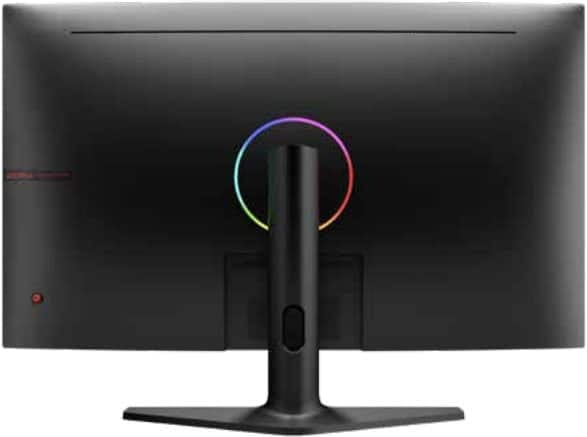
The stand of the monitor is tilt-only, but the screen is VESA mount compatible via the 75x75mm pattern. There’s adjustable RGB lighting on the rear of the monitor.
Connectivity options include DisplayPort 1.2, two HDMI 2.0 ports and a headphone jack.
Alternatives
- LG 32G600A – with a steeper 1000R screen curvature and an ergonomic stand
- MSI MAG 321CQF E18
- Acer EDA323QU S3
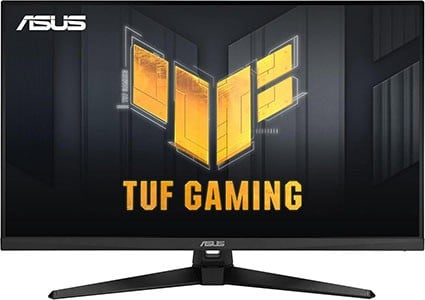
ASUS VG32AQA1A
Flat-Screen 32″ 1440p 170Hz Gaming Monitor
Panel: VA
Resolution: 2560×1440
Refresh Rate: 170Hz
The Pros:
- High contrast ratio
- MBR and VRR up to 165Hz
The Cons:
- Minor smearing in fast-paced games, mainly in darker scenes
- VRR brightness flickering in dark scenes of games with fluctuating frame rates (expected drawback of OLED and VA panels)
- Tilt-only stand
About The Monitor
Do you prefer flat screens at this screen size? In that case, we recommend the ASUS VG32AQA1A.
Image Quality
Unlike the Koorui 32E6QC, the ASUS VG32AQA1A doesn’t support a wide color gamut, yet it is more expensive, so we are more inclined to recommend the Koorui model here as it does offer better value for the money.
Here’s some friendly advice: if you are worried about the screen curvature, be sure to check out how curved monitors look in person before jumping to any conclusions.
Although the curvature isn’t as necessary here as it’s on ultrawide monitors, we actually prefer it on 32″ sized monitors as it does make the viewing experience more immersive.
On the other hand, if you’ve experienced curved screens and would rather stick to flat screens, the ASUS VG32AQA1A is an all-around solid display.
It has the standard 100% sRGB color gamut and it’s factory-calibrated, so you’ll get accurate and vibrant colors without over-saturation for sRGB content, which includes most video games and web content anyway.
Next, the monitor has a high contrast ratio of 3,000:1 for deep blacks as well as a decent 300-nit peak brightness.
VRR is supported with a 48-170Hz VRR range via DisplayPort and 48-144Hz via HDMI. Some users have also reported brightness flickering when using VRR.
Other useful features include ELMB Motion Blur Reduction, Shadow Boost, crosshair overlays, on-screen timers and a refresh rate tracker.
Design & Connectivity
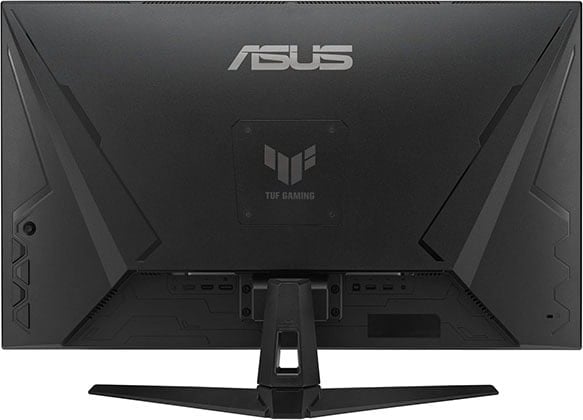
The stand of the monitor is tilt-only, while the screen is VESA mount compatible via the 100x100mm pattern.
Connectivity options include two HDMI 2.0 ports, DisplayPort 1.2, a headphone jack and dual 2W integrated speakers.
Alternatives
- Samsung S27CG51 – based on the same panel with an ergonomic stand, but it’s more expensive
- Acer GA321QUP – based on the same panel with built-in Google TV, USB-C with 90W PD, ergonomic stand, dual 5W speakers

KTC H32S25E
Best 1440p 240Hz Curved Gaming Monitor
Panel: VA
Resolution: 2560×1440
Refresh Rate: 240Hz
The Pros:
- High contrast ratio
- Wide color gamut
- Plenty of features, including VRR and MBR up to 240Hz
The Cons:
- 1000R curvature too steep for some users
- VRR brightness flickering in dark scenes of games with fluctuating frame rates (expected drawback of VA panels)
- Tilt-only stand
About The Monitor
With the KTC H32S25E, you get a high 240Hz refresh rate paired with a high contrast ratio.
Image Quality
Thanks to the monitor’s high 2,500 static contrast ratio and a wide 90% DCI-P3 color gamut, you’re getting an immersive image quality with deep blacks and vibrant colors.
But there’s more. What makes the KTC H32S25E so special is, first of all, the rapid 240Hz refresh rate, which may not offer as noticeable improvement over 144Hz as 144Hz does over 60Hz, but the difference is definitely noticeable.
Further, the KTC H32S25E supports VRR up to 240Hz for tear-free gameplay. Sadly, as is the case with most VA and OLED displays, there’s some brightness flickering in games with fluctuating frame rates.
Other standard gaming features such as custom crosshairs, pre-calibrated picture presets and Black Equalize are available too.
Check out our in-depth KTC H32S25E review for more information.
Design & Connectivity

The design of the monitor includes a steep 1000R curvature, which matches the curvature of the human eye for added immersion, though some people might find that the curvature is too aggressive.
The stand is tilt-only, but the screen is VESA mount compatible via the 100x100mm pattern.
Connectivity options include two DisplayPort 1.4 ports, two HDMI 2.0 ports (max 144Hz at 1440p), a headphone jack and a USB hub for service and firmware updates.
Alternatives
Samsung offers a similar gaming monitor, the Odyssey G6, with DisplayHDR 600 and built-in Tizen smartOS, however, it’s a lot more expensive, while the HDR image quality is underwhelming since it lacks FALD.
Best 32″ HDR Monitors
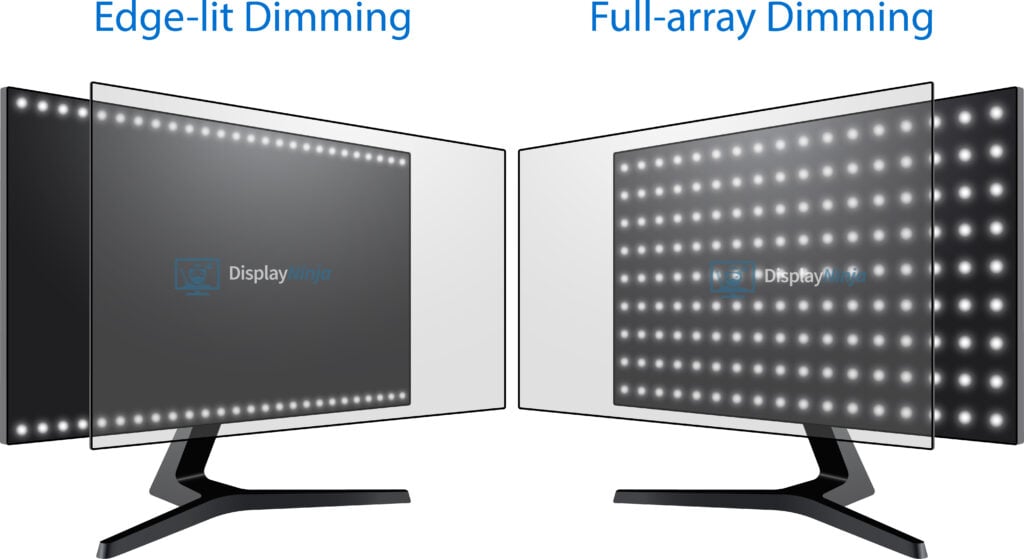
Want a 32″ monitor with proper HDR support? You’ll need a model with a FALD (full array local dimming) backlight or an OLED panel!
Acer XV325QK V3
Best 32″ Mini LED Monitor
Panel: IPS
Resolution: 3840×2160
Refresh Rate: 160Hz + 1080p 320Hz
The Pros:
- High pixel density
- Stellar peak brightness, high contrast ratio thanks to 1152-zone backlight
- Accurate and vibrant colors
- Plenty of features including VRR up to 320Hz
- Fully ergonomic stand
The Cons:
- Minor blooming/haloing noticeable in certain scenes
About The Monitor
The Acer XV325QK V3 is the best 32″ mini LED display currently available.
Image Quality
The Acer XV325QK V3 has 1152 zones spread across the entire panel, which can dim the areas of the screen that are supposed to be dark. As a result, you simultaneously get deep blacks and bright whites.
In some demanding scenes (fireworks, stars in the night sky, etc.), blooming will be noticeable as the light from illuminated objects bleeds into the surrounding dimmed zones, but this is an expected drawback of this technology.
The Acer XV325QK V3 also has an exceptional color gamut with 99% Adobe RGB and DCI-P3 color space coverage, Delta E < 2 factory calibration, a high peak brightness of up to 1,000-nits and a rapid 1ms quoted GtG pixel response time.
It also supports VRR for tear-free gameplay up to 160FPS at 4K or 320FPS at 1080p.
Design & Connectivity
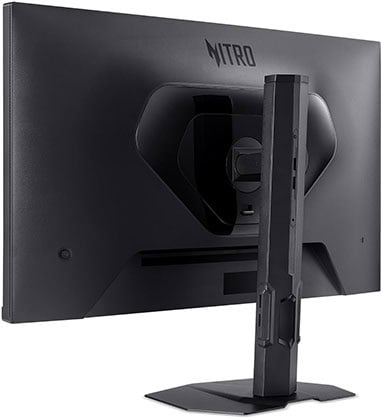
The stand is sturdy and offers height adjustment, swivel, tilt, pivot and 100x100mm VESA mount compatibility.
Connectivity options include two HDMI 2.1 ports with full 48 Gbps bandwidth, two DP 1.4 inputs with DSC and a headphone jack.
Alternatives
- Innocn 32M2V / Innocn 32A6V – 32″ 4K 144Hz IPS models with a 1152-zone mini LED FALD, USB-C (90W PD) and KVM, but no Dual Mode. They go for $500 – $800, so we only recommend them when on sale
- KTC M32P10 – similar to the Innocn models but with lower 45W PD, but it might be discontinued
MSI MPG 321URX
Best 32″ QD-OLED Gaming Monitor
Panel: OLED
Resolution: 3840×2160
Refresh Rate: 240Hz
The Pros:
- Infinite contrast ratio, decent peak brightness, wide color gamut
- High pixel density
- Instant response time
- Plenty of features, including VRR up to 240Hz
- Ergonomic design and rich connectivity options, including KVM and USB-C with 90W PD
- 3-year warranty that covers burn-in
The Cons:
- Risk of burn-in
- Not as bright as mini LED panels
About The Monitor
The MSI MPG 321URX is one of the best 32″ OLED gaming monitors available!
Image Quality
Thanks to its OLED panel with self-emissive pixels, the MSI MPG 321URX provides you with an infinite contrast ratio as individual pixels can completely turn off to display true blacks.
On top of that, you get an exceptional 99.3% DCI-P3 gamut for vibrant colors and instantaneous pixel response time speed for zero ghosting in fast-paced games, as well as buttery-smooth VRR performance up to 240FPS.
While OLED displays can’t get as bright as some mini LED monitors, you still get a decent brightness performance with 250-nits peak for a 100% white window and up to 1,000-nits for small HDR highlights.
The monitor is also factory calibrated at Delta E < 2 for both sRGB and DCI-P3 modes and offers standard gaming features, such as Night Vision, crosshair overlays, etc.
Check out our full MSI MPG 321URX review for more details.
Design & Connectivity

The stand of the monitor is sturdy and offers a good range of ergonomics, including up to 110mm height adjustment, -5°/15° tilt, +/- 30° swivel, +/- 10° pivot for balancing and 100x100mm VESA mount compatibility.
It has a heatsink for cooling and a semi-glossy screen finish for a more vivid image, but it’s reflective and raises the black level when hit with direct lighting.
Connectivity options include DisplayPort 1.4 with DSC, two HDMI 2.1 ports with full 48 Gbps and CEC support, USB-C with DP Alt Mode and 90W Power Delivery, a dual-USB 2.0 hub (2 downstream + 1 upstream type B), a headphone jack and built-in KVM functionality.
Alternatives
The MSI MPG 321URX is the most affordable 32″ 4K 240Hz QD-OLED model in the US, going for just $950. However, in other regions, the following alternatives might be cheaper.
| Dell AW3225QF | MSI 321CURX | ASUS PG32UCDM | Samsung G80SD | Gigabyte FO32U2 | Gigabyte FO32U2P | MSI 321URX | MSI 321UPX | HP Omen Transcend 32 | |
| Screen | Glossy (Curved) | Glossy (Curved) | Glossy | Matte | Glossy | Glossy | Glossy | Glossy | Glossy |
| Video Ports | DP 1.4, 2x HDMI 2.1 | DP 1.4, 2x HDMI 2.1, USB-C 98W | DP 1.4, 2x HDMI 2.1, USB-C 90W | DP 1.4, 2x HDMI 2.1 | DP 1.4, 2x HDMI 2.1, USB-C 18W | DP 2.1, mini-DP 2.1, 2x HDMI 2.1, USB-C 65W | DP 1.4, 2x HDMI 2.1, USB-C 90W | DP 1.4, 2x HDMI 2.1, USB-C 15W | DP 2.1, 2x HDMI 2.1, USB-C 140W |
| Other Ports | 3x USB-A, USB-B, USB-C | 2x USB-A, USB-B | 3x USB-A USB-B, HP, SPDIF | 2x USB-A, USB-B | 2x USB-A, USB-B, HP, Mic, 2x5W | 2x USB-A, USB-B, HP, Mic, 2x5W | 2x USB-A, USB-B, HP | HP | 3x USB-A, 2x USB-C, HP, 4x3W |
| Dolby Vision | Yes | No | Yes | No | No | No | No | No | Yes |
| KVM | No | Yes | Yes | No | Yes | Yes | Yes | No | Yes |
| Cooling | Active | Passive | Passive | Passive | Passive | Passive | Passive | Passive | Active |
| Burn-in warranty | 3 years | 3 years | 3 years | 3 years | 3 years | 3 years | 3 years | 3 years | 3 years |
| Price (MSRP) | $1200 | $850 | $1300 | $1300 | $1100 | $1200 | $900 | $800 | $1,300 |
MSI also offers the MSI MPG 321URXW with white design and the MSI MPG 322URX with DisplayPort 2.1 (80 Gbps).
Note that there are also cheaper 32″ 4K 165Hz QD-OLED models, such as the MSI MGA 321UP.
In 2026, other manufacturers are going to release various 32″ 4K 240Hz QD-OLED flat-screen models with improved screen coating and higher-tier DisplayHDR True Black 500 certification. Check out our OLED monitors article for more details.

ASUS XG32UCWMG
Best 32″ W-OLED Gaming Monitor
Panel: OLED
Resolution: 3840×2160
Refresh Rate: 240Hz (1080p 480Hz)
The Pros:
- Wide color gamut, high pixel density
- Plenty of features, including VRR up to 240Hz, 1080p 480Hz Mode, and ELMB up to 120Hz
- Ergonomic design and rich connectivity options, including KVM and USB-C 15W PD
- 3-year burn-in warranty
The Cons:
- Risk of burn-in
- Not as bright as mini LED panels
About The Monitor
If you want a 32″ 4K 240Hz OLED gaming monitor with a 1080p 480Hz Dual Mode, you should consider the ASUS XG32UCWMG!
Image Quality
The ASUS XG32UCWMG has a feature that can switch between 4K 240Hz and 1080p 480Hz modes in a few seconds!
Naturally, because the monitor is displaying a non-native resolution, 1920×1080 will be a bit blurry on the 31.5″ sized display, but if you push the monitor a bit further, it won’t be that noticeable in games and videos, while 480Hz provides you with incredible motion clarity!
It uses a W-OLED panel with a new subpixel layout, so there’s no fringing on small text and fine details, like it’s the case with previous-gen W-OLED panels.
You also get improved brightness performance with up to 275-nits for 100% APL and up to 1300-nits for < 3% APL. Samsung’s QD-OLED panels still have a wider color gamut and higher color volume, so they have a higher perceived brightness.
Regardless, the colors are vibrant on the ASUS XG32UCWMG thanks to its wide 98.5% DCI-P3 color gamut coverage. The monitor also supports true 10-bit color depth, has 178° wide viewing angles and a calibrated sRGB emulation mode.
Other features include VRR up to 240Hz (480Hz at 1080p), Shadow Boost, a refresh rate tracker, ELMB up to 120Hz and crosshair overlays.
Design & Connectivity
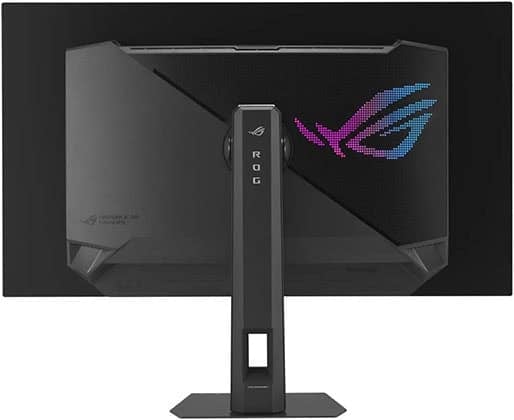
The stand of the monitor offers height adjustment up to 80mm, +/- 15° swivel, -5°/20° tilt and 100x100mm VESA mount compatibility.
The screen has ASUS’ TrueBlack glossy coating, which offers a more vivid image quality (but it’s also more reflective). Moreover, unlike QD-OLED’s semi-glossy finish, it doesn’t raise blacks when hit by direct lighting.
Connectivity options include DP 1.4 with DSC, two HDMI 2.1 ports with full 48 Gbps bandwidth, USB-C with DP Alt Mode and 15W PD, three downstream USB-A 3.0 ports, USB-B, built-in KVM and a headphone jack.
Alternatives
- ASUS XG32UCWG – same model with lower 165Hz refresh rate (1080p 330Hz) for $100 less
- LG 32GS95UE – LG’s model based on the same panel, however, it doesn’t have USB-C, KVM or ELMB. Moreover, its burn-in warranty is only 2 years
- ASUS PG32UCDP – ASUS’ model with higher 98W PD over USB-C and a matte anti-glare coating
- KTC G32P5 – KTC’s model, the most affordable option in Europe, but it’s not available in the US
In 2026, we’re also expecting 32″ 4K 240Hz (1080p 480Hz) models with a newer Tandem W-OLED panel for a higher 1500-nit peak brightness. For more alternatives, check out our OLED monitors article.
Conclusion
If you’re still not sure which 32-inch monitor is perfect for you, leave us a comment below, and we’ll gladly help you out!
All in all, unless you’re on a tight budget, we recommend investing in one of the 1440p models as 1080p really looks pixelated on 32″ monitors.
This is why we recommend the Koorui 32E6QC as the best budget model for gaming. If you just want a cheap 1080p display, you should get the LG 32MR50C.
The KTC H32S25E kicks it up a notch further, but at a higher price, so consider it only if you have a powerful enough PC rig to put it to good use.
For HDR, we recommend the MSI MPG 321URX, the ASUS XG32UCWMG, and the Acer XV325QK V3, depending on your panel technology preference.
Updates +
- January 17, 2026:
– Replaced the KTC M32P10 with the Acer XV325QK V3.
– Removed the Gigabyte GS32Q, the Titan Army P32A2S2, the MSI MAG 321CUPDF, the MSI MAG 322URDF E16, the Samsung Neo G7 and the BenQ EX321UX. - November 21, 2025:
– Checked up on the guide to ensure that our picks are still the best options available. - October 29, 2025:
– Removed the LG 32UP83A.
– Replaced the Gigabyte M32QC with the Koorui 32E6QC, the Gigabyte M32UC with the MSI MAG 321CUPDF, the Arzopa M3RC with the ASUS XG32UCG, the Innocn 32M2V with the KTC M32P10, the ASUS PG32UCDP with the ASUS XG32UCWMG, and the LG 32GN650 with the ASUS VG32AQA1A. - July 9, 2025:
– Checked up on the guide to ensure that our picks are still the best options available. - June 6, 2025:
– Replaced the MSI MAG323UPF with the Arzopa M3RC. - April 11, 2025:
– Replaced the LG 32ML600M with the ViewSonic VA3209M. - April 10, 2025:
– Removed the LG 32QN600.
– Replaced the Sceptre E325B-QPN168 with the Gigabyte GS32Q. - November 23, 2024:
– Replaced the Samsung M70D with the KTC A32Q8. - November 5, 2024:
– Replaced the Sceptre U325W-UPT with the LG 32UP83A, the Samsung M70B with M70D, the Samsung Odyssey G6 with the KTC H32S25E, and the LG 32GQ850 with the Titan Army P32A2S2.
– Added review summary for the BenQ EX321UX. - September 16, 2024:
– Added the KTC H32S25E to the table. A review summary will be added soon. - August 2, 2024:
– Replaced the LG 32GS95UE with the ASUS PG32UCDP. - May 27, 2024:
– Replaced the ASUS PG329Q with the Sceptre E325B-QPN168, the Dell AW3225QF with the MSI MPG 321URX, and the Samsung Odyssey G7 with the Odyssey G6.
– Added the LG 32GS95UE. - February 6, 2024:
– Replaced the Gigabyte M32U with the MSI MAG323UPF and the Acer X32FP with the Innocn 32M2V. - January 16, 2024:
– Added the Dell AW3225QF. - December 23, 2023:
– Added the LG 32MR50C. - November 24, 2023:
– Added the Sceptre E325B-QPN168 as an alternative to the ASUS PG329Q. - November 1, 2023:
– Added the Sceptre U325W-UPT, the Samsung M70B, the LG 32BQ85U and the Innocn 32Q1U.
– Replaced the Gigabyte M32Q with the ASUS PG329Q.
– Removed the LG 32UN500, the Philips 328E1CA and the LG 32UP83A (these are now mentioned as alternatives to the Sceptre U325W-UPT. - March 13, 2023:
– Added the Acer X32FP and the Gigabyte M32U.
– Removed the LG 32GQ950. - November 22, 2022:
– Checked up on the guide to ensure that our picks are still the best options available. - August 31, 2022:
– Replaced the Gigabyte G32QCA with the M32QC, the Acer XB323UGX with the LG 32GQ850, and the MSI MPG321UR-QD with the LG 32GQ950.
– Added the Gigabyte M32UC and the Samsung Neo G7. - February 16, 2022:
– Updated alternatives for the MPG321UR-QD. - November 25, 2021:
– Checked up on the guide to ensure that our picks are still the best options available. - November 19, 2021:
– Removed the Philips 322E1C and 325E1C, as well as the AOC C32G1.
– Added the MSI MPG321UR-QD. - August 5, 2021:
– Replaced the AOC Q3279VWFD8 with the LG 32QN600; the LG 32GK650F with the LG 32GN650; and the Acer XB323UGP with the Gigabyte M32Q.
– Removed the HP Pavilion Gaming 32 and the Samsung CHG70.
– Added the Acer XB323UGX, the Gigabyte M32U, and the ASUS PG32UQX to the table; dedicated review sections will be added soon. - May 1, 2021:
– Improved readability across the board and fixed spelling/grammar issues. - February 24, 2021:
– Replaced the Philips 328E9QJAB with the updated Philips 322E1C model.
– Removed the ASUS CG32UQ.
– Added the LG 32UN650. - February 10, 2021:
– Added the LG 32GN650 as an alternative to the LG 32GK650F.


