
While new monitors with higher resolutions and faster refresh rates are continuously being released and announced left and right, their prices are jumping up accordingly as well.
Luckily, this also signifies that older technology is becoming more affordable!
As a result, for just $200 – $250, you can nowadays get a fast 240Hz monitor for competitive gaming, a 4K display for amazing detail clarity, an ultrawide screen for extra immersion, or a 1440p 144Hz gaming monitor for mixed-use.
Note that some of these monitors are under $250 only when they’re on sale, but these sales are frequent. So, if the monitor you’re interested in goes for over $250, consider waiting for it to go on sale, check out our recommended alternatives, or visit our best monitors under $200 guide.
| Monitor | Size | Panel | Resolution | Refresh Rate | ||
|---|---|---|---|---|---|---|
| Best 1080p Monitor | 25” | IPS | 1920x1080 | 280Hz | ||
| Best 1440p Monitors | 27” | IPS | 2560x1440 | 320Hz | ||
| 27” | VA | 2560x1440 | 240Hz | |||
| Best UltraWide Monitors | 34” | VA | 3440x1440 | 165Hz | ||
| 34” | IPS | 3440x1440 | 115Hz | |||
| Best 4K Monitors | 32” | VA | 3840x2160 | 60Hz | ||
| 27” | IPS | 3840x2160 | 144Hz, 1080p 288Hz | |||
| Best HDR Monitor | 27” | VA | 2560x1440 | 180Hz |


AOC Q27G40XMN

- 27″ 1440p 180Hz
- 1152-zone mini LED FALD
- DisplayHDR 1000
As you can see, you can get a pretty awesome gaming monitor at this price range!
If you’re looking for something more modest, such as a 1080p 144Hz gaming monitor, make sure to visit our best gaming monitor under 200 USD buyer’s guide.
In case you can afford something pricier, check out our ultimate best gaming monitor guide.
If you want to view our changelogs for this particular buying guide, you can do so at the end of this article.
Best 1080p Gaming Monitor
If you have an entry-level GPU or just want to achieve the highest frame rate possible, you should get a 1080p gaming monitor!

ASUS VG259QM
240Hz IPS Gaming Monitor Under $250!
Size: 25”
Panel: IPS
Resolution: 1920×1080
Refresh Rate: 240Hz (280Hz OC)
VRR: FreeSync (G-SYNC Compatible)
The Pros:
- Quick response time
- VRR and MBR up to 280Hz
- Accurate colors, wide viewing angles
- Fully ergonomic design
The Cons:
- IPS glow and mediocre contrast ratio (as expected from this panel technology)
About The Monitor
Want a gaming monitor with the highest refresh rate, lowest input lag, and fastest pixel response time under $250? Look no further than the ASUS VG259QM!
Image Quality
This display is based on a 24.5″ IPS panel with a rapid 1ms GtG response time that’s needed to eliminate motion blur and trailing behind fast-moving objects.
What’s more, it’s capable of doing that without sacrificing color accuracy or viewing angles as the TN panels do!
So, you’ll get precise, consistent and rich colors, while the image remains perfect regardless of the angle you’re looking at the screen!
Further, the monitor has a 400-nit peak brightness, which is more than enough even in rooms with strong lighting. The contrast ratio amounts to 1,000:1, which is standard for both IPS and TN panels.
Black depth isn’t quite as good as it is on VA panels with a ~3,000:1 contrast ratio, but VA monitors at this price range have other issues, such as narrower viewing angles and notably slower response time that causes smearing in fast-paced games, at least at this price range.
Features
Moving on, the ASUS VG259QM offers plenty of additional gaming features.
It supports variable refresh rate (VRR), which can entirely remove screen tearing and stuttering within the 48-280Hz/FPS (Frames Per Second) variable refresh rate (VRR) range of the monitor.
Other useful features include ‘Shadow Boost’ for better visibility in shadows in video games, various picture presets, crosshair overlays, a refresh rate tracker, on-screen timers and ELMB-Sync (Extreme Low Motion Blur) backlight strobing technology that can work at the same time as VRR.
Design & Connectivity

The design of the monitor is also very good considering its price.
You get full ergonomic support, including up to 130mm of height adjustment, -5°/33° tilt, +/- 90° swivel, +/- 90° pivot and 100x100mm VESA mount compatibility.
Connectivity options include two HDMI 2.0 ports, DisplayPort 1.2, dual 2W integrated speakers and a headphone jack.
Alternatives
If you plan on using backlight strobing, we highly recommend investing $30 more in the ViewSonic XG2431 with Blur Busters Approved MBR performance.
Best UltraWide Gaming Monitor
Looking for a monitor with a wider aspect ratio? We recommend the following model!

KTC H34S18S
Best UltraWide Monitor Under $250
Size: 34”
Panel: VA
Resolution: 3440×1440
Refresh Rate: 165Hz
VRR: FreeSync (G-SYNC Unstable)
The Pros:
- High pixel density
- Wide color gamut, high contrast ratio
- Plenty of features, including VRR and MBR up to 165Hz
- Ergonomic stand
The Cons:
- VRR brightness flickering in some games when FreeSync or G-SYNC is enabled (expected on VA panels)
- Minor ghosting in fast-paced games, mainly in darker scenes
- VRR brightness flickering in some games when FreeSync or G-SYNC is enabled (expected on VA panels)
About The Monitor
The KTC H34S18S is the best budget 34″ 3440×1440 high refresh rate curved VA gaming monitor!
Image Quality
Thanks to its ultrawide aspect ratio, the KTC H34S18S provides you with an immersive viewing experience with a wider field of view in compatible games!
On top of that, it has a VA panel with a high 4,000:1 contrast ratio, a decent 350-nit peak brightness and a wide ~90% DCI-P3 gamut coverage for vibrant colors.
It doesn’t have quite as fast response time as IPS panels, so some minor ghosting will be noticeable behind fast-moving objects in darker scenes, but this won’t bother most gamers.
Check out our detailed KTC H34S18S review for more information.
Design & Connectivity

The stand of the monitor offers a good range of ergonomics, including up to 90mm height adjustment, +/- 20° swivel, +/- 5° pivot, -5°/20° tilt and 100x100mm VESA mount compatibility. The screen has a moderate 1500R curvature for added immersion.
Connectivity options include 2x HDMI 2.0 ports, 2x DisplayPort 1.4 ports, a headphone jack and a USB port for service/firmware updates.
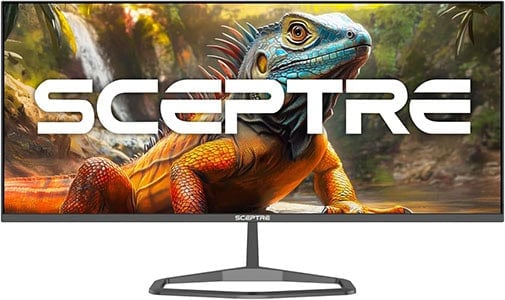
Sceptre E345W-QU120D
34″ 3440×1440 IPS UltraWide
Size: 34”
Panel: IPS
Resolution: 3440×1440
Refresh Rate: 115Hz
VRR: FreeSync (G-SYNC Stable)
The Pros:
- Quick response time
- Wide viewing angles
- Plenty of gaming features, including VRR and MBR up to 115Hz
The Cons:
- IPS glow and mediocre contrast ratio (as expected from this panel technology)
- Tilt-only stand
About The Monitor
If you’d rather have a 34″ ultrawide monitor with an IPS panel for wider viewing angles and faster response time, the Sceptre E345W-QU120D is for you!
Image Quality
The Sceptre E345W-QU120D is a 34″ 3440×1440 flat-screen IPS display, which provides you with a consistent image without gamma/saturation shifts, no VRR brightness flickering and fast response time without dark level smearing!
Alas, IPS monitors suffer from IPS glow and a mediocre contrast ratio of around 1,000:1, so blacks won’t be as deep, resulting in a less immersive viewing experience in a dark room.
Further, it has a 103% sRGB color gamut volume, so colors won’t be as vibrant as on the H34S18S, but you get vivid colors nonetheless, just without over-saturation, which some users might prefer.
The monitor has a maximum refresh rate of 115Hz, which is still enough to provide you with a huge motion clarity boost in comparison to the typical 60-75Hz displays. VRR and MBR are supported as well.
Design & Connectivity
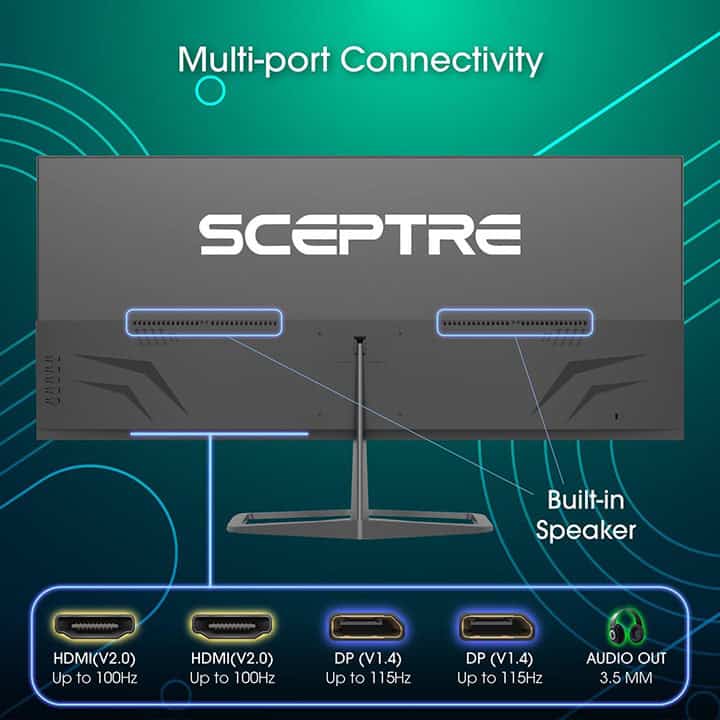
The stand of the monitor is tilt-only, but the screen is VESA mount compatible.
Connectivity options include two HDMI 2.0 ports, two DP 1.4 inputs, a headphone jack and two integrated speakers for basic audio output.
Best 4K Monitor
Want a 4K UHD display? Here’s what we recommend if your budget is $200 – $250!

KTC A32Q8
Budget 32″ 4K Monitor
Size: 32”
Panel: VA
Resolution: 3840×2160
Refresh Rate: 60Hz
VRR: FreeSync (G-SYNC Stable)
The Pros:
- High contrast ratio
- High pixel density
- Built-in Google TV
- VRR up to 60Hz
- USB-C with 65W PD
The Cons:
- Only 60Hz
- Tilt-only stand
About The Monitor
If you want a basic 27″ 4K IPS display, you can actually find one for less than $200, the Sceptre U275W-UPT. For ~$250, you can get the KTC A32Q8 with a 32″ 4K VA display.
Image Quality
The KTC A32Q8 is one of the most affordable 32″ 4K VA displays, yet it features built-in Google TV smart OS and comes with a remote controller!
It has a VA panel with a high 3,000:1 contrast ratio, a 250-nit peak brightness and a bit wider color gamut than standard with ~83% DCI-P3 coverage.
Check out our in-depth KTC A32Q8 review for more details.
Design & Connectivity

The stand of the monitor is tilt-only, but it’s VESA mount compatible. The monitor also has WiFi and Bluetooth support.
Connectivity options include HDMI 2.0, DP 1.4, a USB-C port with DisplayPort Alternate Mode and 65W Power Delivery, allowing you to charge a compatible laptop, four downstream USB-A ports, a headphone jack and integrated speakers.
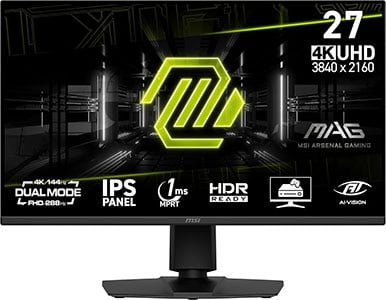
MSI MAG 275UPD E14
4K 144Hz Dual Mode Monitor
Size: 27”
Panel: IPS
Resolution: 3840×2160
Refresh Rate: 144Hz + 1080p 288Hz
VRR: FreeSync (G-SYNC Stable)
The Pros:
- Wide color gamut
- Quick response time speed
- Plenty of features, including VRR up to 144Hz, 288Hz at 1080p
- Fully ergonomic stand
The Cons:
- IPS glow and mediocre contrast ratio (as expected from this panel technology)
About The Monitor
Want a 27″ 4K display with a high refresh rate for $250? The MSI MAG 275UPD E14 is for you!
Image Quality
The best thing about the MSI MAG 275UPD E14 is that its lower price doesn’t really come with any meaningful compromises compared to more expensive alternatives.
It uses an IPS panel with a wide 90% DCI-P3 color gamut, so colors look rich and vibrant. On top of that, its fast response time ensures smooth motion with no noticeable ghosting behind fast-moving objects.
The 4K UHD resolution looks extremely sharp on a 27-inch screen, delivering a pixel density of 163 PPI. Combined with wide 178° viewing angles, the image stays clear and consistent.
As expected from an IPS display, the contrast ratio is around 1,500:1. This means blacks aren’t as deep as what you’d get from a VA panel (which can reach around 3,000:1), but there aren’t any 4K 144Hz VA monitors available at this size anyway, as those start at 32 inches and up.
Brightness is limited to 250 nits, which is on the low end for modern LED-backlit displays, but it’s still bright enough for typical indoor use. If you plan on using the monitor in a very bright room (near a large window or under strong studio lighting), you may want to consider a brighter alternative.
Further, the MSI MAG 275UPD E14 supports a variable refresh rate (VRR) for tear-free gameplay up to 144FPS at 4K and up to 288FPS at 1080p. HDMI 2.1 VRR also provides a variable refresh rate for the PS5.
Other features include MPRT, Night Vision (improves visibility in darker scenes), custom crosshairs and a refresh rate tracker.
Design & Connectivity
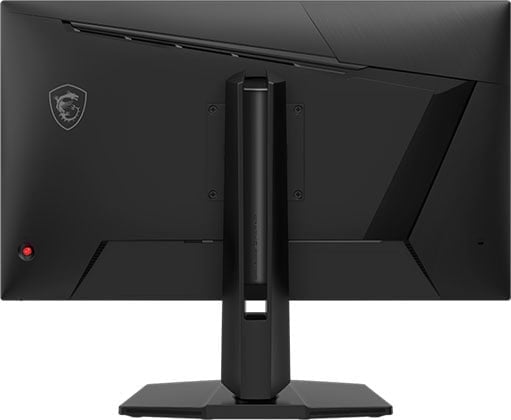
The design is robust and versatile with a good range of ergonomics, such as +/- 30° swivel, +/- 90° pivot, 130mm height adjustment, -5°/20° tilt and 100x100mm VESA mount compatibility.
Connectivity options include two HDMI 2.1 inputs, DisplayPort 1.4 with DSC, a headphone jack and dual 2W integrated speakers.
Alternatives
There are a few better 27″ 4K 144Hz monitors available, but these go for over $300.
- KTC H27P6 – with USB-C 90W PD and KVM, 400-nits
- Gigabyte M27UP – with USB-C 18W PD and KVM, 400-nits
- Koorui G2741L – 4K 160Hz (1080p 320Hz), 400-nits
- KTC H27P22S, Gigabyte GS27U – no Dual Mode, 400-nits
Best HDR Monitor
Nowadays, you can even find a proper HDR display for under $250!
AOC Q27G40XMN
Proper HDR Monitor Under $250
Size: 27”
Panel: VA
Resolution: 3840×2160
Refresh Rate: 180Hz
VRR: FreeSync (G-SYNC Unstable)
The Pros:
- High peak brightness
- Wide 96% DCI-P3 and 90% Adobe RGB color gamut
- 336-zone mini LED FALD
- Decent response time, low input lag
- Plenty of features, including VRR up to 180FPS
- Fully ergonomic stand
The Cons:
- Minor blooming/haloing noticeable in certain scenes
- Minor ghosting
About The Monitor
The AOC Q27G40XMN usually goes for $300, but it can be found on sale for $250, which makes it the cheapest monitor with proper HDR support!
Image Quality
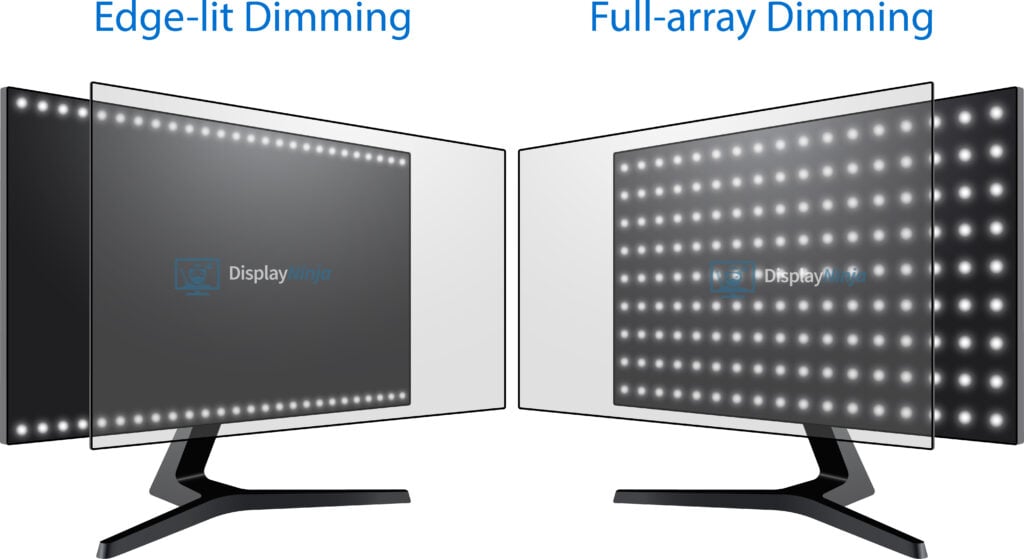
While there are many LED-backlit displays that can accept the HDR10 signal and display it, for a true HDR viewing experience, you’ll need either full-array local dimming or an OLED panel.
The AOC Q27G40XMN has 1152 dimming zones spread across the panel that can dim areas of the image that are supposed to be dark without affecting the areas that should remain bright, thus significantly increasing the contrast ratio!
On top of that, the monitor can reach a stellar 1,000-nit peak brightness for vivid highlights and has an exceptional color gamut with 97% DCI-P3. There’s also a dedicated sRGB mode and Delta E < 2 factory calibration.
The only downsides are those inherent to VA and mini LED technologies, such as slower response time (noticeable ghosting in dark scenes), minor gamma and saturation shifts, and FALD blooming in demanding scenes.
Check out our full AOC Q27G40XMN review for more information.
Design & Connectivity

The stand of the monitor is tilt-only, but it’s VESA mount compatible via the 100x100mm pattern.
Connectivity options include HDMI 2.0, DP 1.4 and a headphone jack.
Conclusion
And that’s that! These are the best monitors for gaming under 250 USD that you can get your hands on right now!
We will update this article as soon as any better deals come up. In the meantime, feel free to leave us a comment below if you need any help picking your next monitor.
Overall, you can’t go wrong with the AOC Q27G40XMN at this price if you want an immersive HDR viewing experience.
If HDR isn’t a priority, the KTC H34S18S delivers a great SDR experience as long as you’re okay with the slower response times – or the Sceptre E345W-QU120D in case you don’t mind its flat screen. Otherwise, the MSI MAG 275UPD E14 is the better pick thanks to its Dual Mode IPS panel.
For competitive gaming, the ASUS VG259QM offers solid performance, but if you have a bit strong PC, try catching the Innocn 27G2T on sale.
Updates +
- February 14, 2026:
– Added the KTC H27E6 and the KTC H27E22. Review summaries will be added soon. - February 4, 2026:
– Added review summaries for the AOC Q27G40XMN, the MSI MAG 275UPD #14 and the Sceptre E345W-QU120D. - April 17, 2025:
– Replaced the Sceptre E325B-QPN168 with the Gigabyte GS32Q. - November 23, 2024:
– Added the Acer XV275U, the KTC H34S18S, the Koorui GP01, the KTC H27E22, the Gigabyte GS27Q-X and the KTC A32Q8.
– Removed the LG 29WQ500, the Sceptre C305B-200UN1, the Acer CBL282K and the Sceptre U325W-UPT. - September 16, 2024:
– Added the Titan Army P2510S to the table. A review summary will be added soon. - June 26, 2024:
– Replaced the MSI G281UV with the Acer CBL282K.
– Added the Innocn 27M2U-D. - June 21, 2024:
– Replaced the Acer XV252QZ with the ASUS VG259QM.
– Removed the AOC CQ27G3S and the Acer XV272UV.
– Added the Sceptre E325B-QPN168. - November 15, 2023:
– Replaced the Dell S2522HG with the Acer XV252QZ, the Viotek GNV29CB with the Sceptre C305B-200UN1.
– Added the Sceptre U325W-UPT. - August 4, 2023:
– Replaced the Sceptre U275W with the MSI G281UV. - November 22, 2022:
– Checked up on the guide to ensure that our picks are still the best options available. - November 14, 2022:
– Replaced the LG 29WP60G with the LG 29WQ500, the Philips 278E1A with the Sceptre U275W, the AOC CQ27G2 with the AOC CQ27G3S and the HP X27q with the Acer XV272UV. - February 11, 2022:
– Added the Acer XV272U.
– Replaced the LG 29WK600 with the newer 29WP60G model. - November 26, 2021:
– Checked up on the guide to ensure that our picks are still the best options available. - August 19, 2021:
– Replaced the Acer XF250Q with the Dell S2522HG.
– Removed the BenQ EX2510.
– Added the Viotek GNV29CB.


