
If $200 is all you can give away for your new display, do not despair — you won’t need a $500+ monitor to enjoy crisp image quality and smooth gaming performance.
In this guide, you’ll find the best monitors for gaming under 200 USD.
All monitors are different from each other, and there’s no doubt that at least one is perfect for you, depending on what type of games you play.
| Monitor | Size | Panel | Resolution | Refresh Rate | VRR | G-SYNC | |
|---|---|---|---|---|---|---|---|
| 27” | IPS | 2560x1440 | 210Hz | FreeSync | Stable | ||
| 27” | IPS | 2560x1440 | 320Hz | FreeSync | Stable | ||
| 25” | IPS | 2560x1440 | 300Hz | FreeSync | Stable | ||
| 30” | VA | 2560x1080 | 200Hz | FreeSync | Unstable | ||
| 30” | IPS | 2560x1080 | 210Hz | FreeSync | Stable | ||
| 34” | IPS | 3440x1440 | 115Hz | FreeSync | Stable | ||
| 27” | IPS | 3840x2160 | 70Hz | N/A | N/A |


KTC 27M1
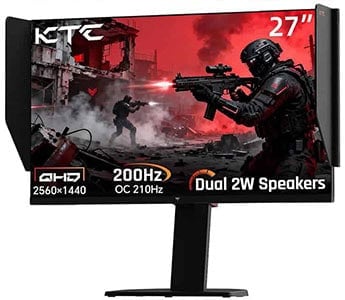
- Quick response time speed
- Wide color gamut
- Smooth VRR performance
Even with less than 200 USD, you can nowadays get a great monitor with either a 1440p high refresh rate panel, 4K UHD resolution or an ultrawide format!
Check out the reviews below to find the best gaming monitor under 200 USD for you!
If you want to view our changelogs for this particular buying guide, you can do so at the end of this article.
KTC 27M1
Affordable 27″ 1440p 210Hz IPS Gaming Monitor
Size: 27”
Panel: IPS
Resolution: 2560×1440
Refresh Rate: 210Hz
VRR: FreeSync
G-SYNC: Stable
The Pros:
- Quick response time
- Wide color gamut
- Wide viewing angles
- Plenty of gaming features, including VRR and MBR up to 210Hz
- Fully ergonomic stand, shielding hood
The Cons:
- IPS glow and mediocre contrast ratio (as expected from this panel technology)
About The Monitor
The KTC 27M1 is a 27″ 1440p 200Hz (210Hz) IPS gaming monitor with a quick pixel response time speed and a wide color gamut, ensuring both an immersive and responsive gaming experience.
Image Quality
Based on an IPS panel, the KTC 27M1 boasts 178° wide viewing angles, meaning that the image will remain perfect regardless of the angle you’re looking at the screen.
Thanks to its 96% DCI-P3 wide color gamut, you get rich and saturated colors – and can even do professional color-critical work.
As it’s the case with all IPS monitors, there’s some IPS glow and the native contrast ratio is mediocre at ~1,500:1, so you won’t get as deep blacks as that of VA panel monitors with a contrast ratio of around 3,000:1. However, VA technology has other disadvantages, which we’ll get into later.
Moving on, the KTC 27M1 monitor has a strong peak brightness of 500-nits and a rapid response time for no visible ghosting behind fast-moving objects.
In addition to its rapid response time, speed and low input lag, the KTC 27M1 supports variable refresh rate (VRR) for tear-free gameplay up to 210Hz.
VRR synchronizes the refresh rate with the GPU’s frame rate. So, if your frame rate is 70 FPS (Frames Per Second), the refresh rate dynamically changes to 70Hz in order to display 70 whole frames without tearing; what’s more, no perceptible latency is added as is the case with V-Sync.
You can use VRR as long as you have an AMD FreeSync-compatible GPU. While not officially certified as ‘G-SYNC Compatible’ by NVIDIA, VRR also works with compatible GeForce GPUs (10-series or newer) over DisplayPort without any issues.
The KTC 27M1 also supports MBR (Motion Blur Reduction) technology called MPRT, which uses backlight strobing to reduce perceived motion blur at the cost of picture brightness. However, VRR and MBR cannot be active at the same time.
Other features include crosshair overlays, Black Equalize (improves visibility in darker scenes), a refresh rate tracker, crosshair overlays and various picture presets.
Check out our in-depth KTC 27M1 review for more details.
Design & Connectivity
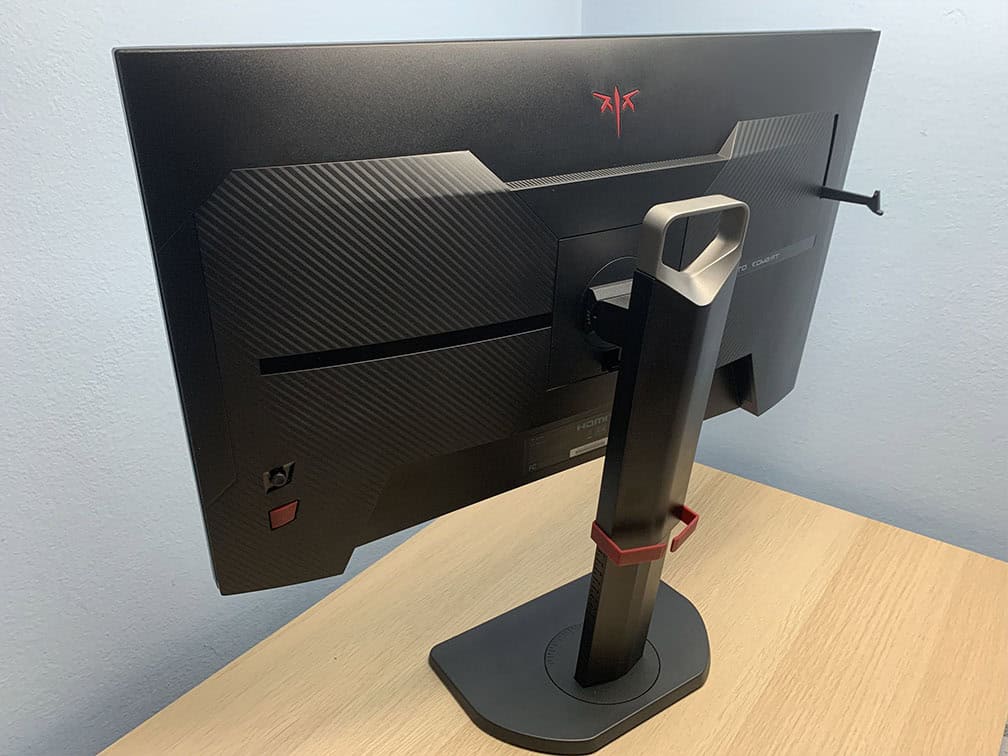
The stand of the monitor is sturdy and offers height adjustment up to 150mm, tilt by -5°/35°, +/- 60° swivel, 90° pivot and 100x100mm VESA mount compatibility.
The stand of the monitor is sturdy and doesn’t take a lot of desk space, allowing you to place your keyboard close to the screen and/or place items on it. The design also involves a cable management bracket, a carrying handle, a headphone hook and a shading hood to minimize distractions.
Connectivity options include two HDMI 2.0 ports (limited to 144Hz), two DisplayPort 1.4 inputs, a headphone jack, dual 2W integrated speakers for basic audio output and a USB port for firmware updates only.
Alternatives
There are plenty of excellent 27″ 1440p high refresh rate IPS gaming monitors available nowadays, ranging from $150 to $200 (depending on sale).
So, we recommend checking them all out and choosing whichever is the cheapest or according to your design/feature preference:

Sansui ES-G25F6Q Pro
25″ 1440p 300Hz IPS Gaming Monitor
Size: 24”
Panel: IPS
Resolution: 2560×1440
Refresh Rate: 300Hz
VRR: FreeSync
G-SYNC: Stable
The Pros:
- Quick response time
- Wide color gamut
- Wide viewing angles
- Plenty of gaming features, including VRR and MBR up to 300Hz
- Fully ergonomic stand
The Cons:
- IPS glow and mediocre contrast ratio (as expected from this panel technology)
About The Monitor
Most competitive FPS players prefer ~24″ sized screens for gaming, but some of them find the 1080p resolution too low, as the image isn’t quite crisp. This is where the Sansui ES-G25F6Q Pro kicks in.
Image Quality
The Sansui ES-G25F6Q Pro is a 24.5″ 1440p 300Hz IPS gaming monitor, providing you with a high pixel density of 120 PPI (pixels per inch)! As a result, you get very sharp details and text, as well as plenty of screen space.
While 1440p is a bit more demanding than 1080p in games, you still get the benefit of notably sharper details, which can sometimes help distinguish certain details in competitive eSports titles.
Further, the monitor has a wide color gamut with 98% DCI-P3 coverage, a 1000:1 contrast ratio, a decent 350-nit peak brightness, and a fast pixel response time speed thanks to its IPS panel.
You also get plenty of gaming features, including crosshair overlays, Blacklevel (improves visibility in dark scenes), a refresh rate tracker, VRR and MBR up to 300Hz.
Design & Connectivity
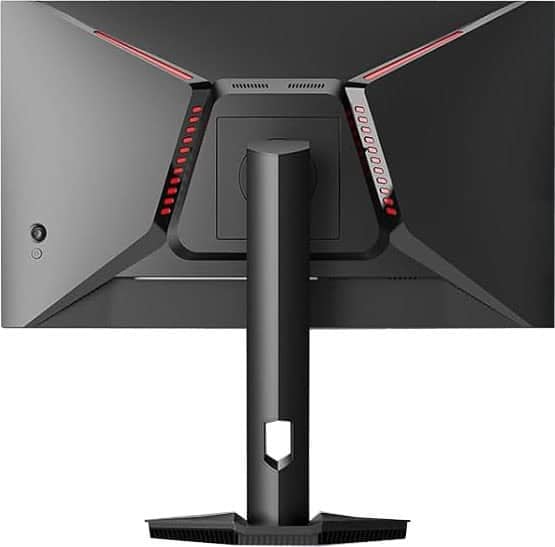
The stand of the monitor offers height adjustment up to 110mm, +5°/20° tilt, +/- 20° swivel, +/- 90° pivot and 100x100mm VESA mount compatibility.
Connectivity options include two DP 1.4 ports, two HDMI 2.1 ports and a headphone jack.
Alternatives
- KTC Q24T09 – 24″ 1440p 180Hz model
- Innocn 25G2S – 24.5″ 1440p 240Hz IPS model, sometimes on sale for under $200
- Innocn 25M2S – 24.5″ 1440p 240Hz IPS model with 576-zone mini LED FALD backlight for proper HDR support. It goes for $250 – 400$
Other gaming monitors for competitive gameplay with a higher refresh rate will cost you around $250. So, you can check out our best monitors under $250 buyer’s guide for 240Hz+ models. However, the KTC H25X7 with a 24.5″ 1080p 400Hz IPS panel can sometimes be found on sale for $200.

Sceptre C305B-200UN1
Best Curved UltraWide Monitor Under $200
Size: 30”
Panel: VA
Resolution: 2560×1080
Refresh Rate: 200Hz
VRR: FreeSync
G-SYNC: Unstable
The Pros:
- High contrast ratio
- Decent pixel density
- AMD FreeSync up to 200Hz
The Cons:
- VRR brightness flickering in some games when FreeSync or G-SYNC is enabled (expected on VA panels)
- Minor ghosting in fast-paced games, mainly in darker scenes
- Tilt-only stand
About The Monitor
Nowadays, you can even get an ultrawide monitor for under 200 USD!
Image Quality
This type of monitor offers a 21:9 aspect ratio as opposed to the standard 16:9, giving you extra horizontal space for a more cinematic viewing experience.
Ultrawide monitors are great for PC gaming, watching movies and multitasking as well.
The Sceptre C305B-200UN1 is the only high refresh rate 21:9 monitor available for under $200. Note that the monitor is 30 inches in diagonal but longer in width than a standard display.
So, the monitor is as tall as a regular ~24-inch 16:9 monitor but wider, which may take some time to get used to.
The Sceptre C305B-200UN1 offers 2560×1080 Full HD Ultra-Wide resolution and since it is a fairly small monitor in size, it will provide you with a decent pixel density of 96 PPI (Pixels Per Inch).
This means that the image will have very sharp details and plenty of screen real estate for you to work with.
It’s based on a VA panel with a high 3,000:1 contrast ratio for deep blacks, supports a high 200Hz refresh rate and covers ~90% of the sRGB color space, resulting in relatively accurate colors without over-saturation.
Keep in mind that video games that don’t support ultrawide resolutions will just have black borders at the sides or stretch the image. You can check which games support the 21:9 aspect ratio here.
Design & Connectivity

Unlike the 29WQ600, the Sceptre C305B has a curved screen (1800R), which adds a bit of depth and immersion to the viewing experience. The stand is tilt-only, but you can mount the screen using the provided VESA mount adapter.
Connectivity options include DisplayPort 1.2, HDMI 1.4, HDMI 2.0, a headphone jack and dual 3W built-in speakers. There are also two red LED strips at the back of the monitor.
Alternatives
We recommend saving up to $20 – $50 more for the KTC H34S18S instead. It has a bigger 34″ screen with a higher 3440×1440 screen resolution and a 165Hz refresh rate.

Sceptre E305B-FU200T
Best UltraWide Monitor Under $200
Size: 30”
Panel: IPS
Resolution: 2560×1080
Refresh Rate: 210Hz
VRR: FreeSync
G-SYNC: Stable
The Pros:
- Quick response time
- Wide viewing angles
- Plenty of gaming features, including VRR and MBR up to 210Hz
The Cons:
- IPS glow and mediocre contrast ratio (as expected from this panel technology)
- Tilt-only stand
About The Monitor
The Sceptre E305B-FU200T is a 30″ 2560×1080 210Hz ultrawide monitor with a flat-screen IPS panel!
Image Quality
In comparison to the Sceptre C305B-200UN1, the E305B-FU200T has a flat-screen IPS panel, which provides you with wider viewing angles and more consistent colors.
You also get a faster pixel response time for no smearing in dark scenes and smooth VRR performance without brightness flickering.
The main downside is that there’s the characteristic IPS glow and the contrast ratio is lower at around 1,000:1, so blacks won’t be quite as deep.
Design & Connectivity

The stand of the monitor is tilt-only, but the screen is VESA mount compatible via the 100x100mm pattern.
Connectivity options include two HDMI 2.0 ports, two DisplayPort 1.4 inputs, a headphone jack and dual 3W integrated speakers.
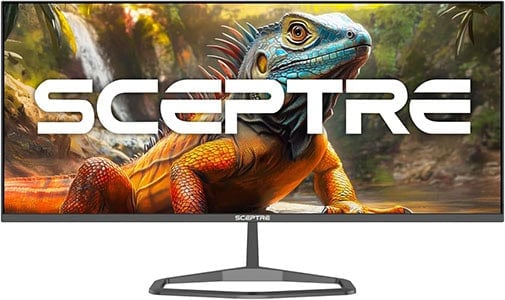
Sceptre E345W-QU120D
Best Value UltraWide Monitor
Size: 34”
Panel: IPS
Resolution: 3440×1440
Refresh Rate: 115Hz
VRR: FreeSync
G-SYNC: Stable
The Pros:
- Quick response time
- Wide viewing angles
- Plenty of gaming features, including VRR and MBR up to 115Hz
The Cons:
- IPS glow and mediocre contrast ratio (as expected from this panel technology)
- Tilt-only stand
About The Monitor
If you’d rather have a 34″ ultrawide monitor with a high resolution, the Sceptre E345W-QU120D offers amazing value.
Image Quality
The Sceptre E345W-QU120D is a 34″ 3440×1440 flat-screen IPS display, which provides you with a high pixel density of roughly 110 PPI. You get plenty of screen space as well as sharp details and text.
It has a 103% sRGB color gamut for vivid colors without over-saturation, a typical 1,000:1 IPS contrast ratio and a 115Hz refresh rate, which still provides a noticeable bump in motion clarity as opposed to the standard 60-75Hz displays.
It also supports VRR for tear-free gameplay up to 115FPS and even has MBR support for less perceived motion blur via backlight strobing.
Design & Connectivity
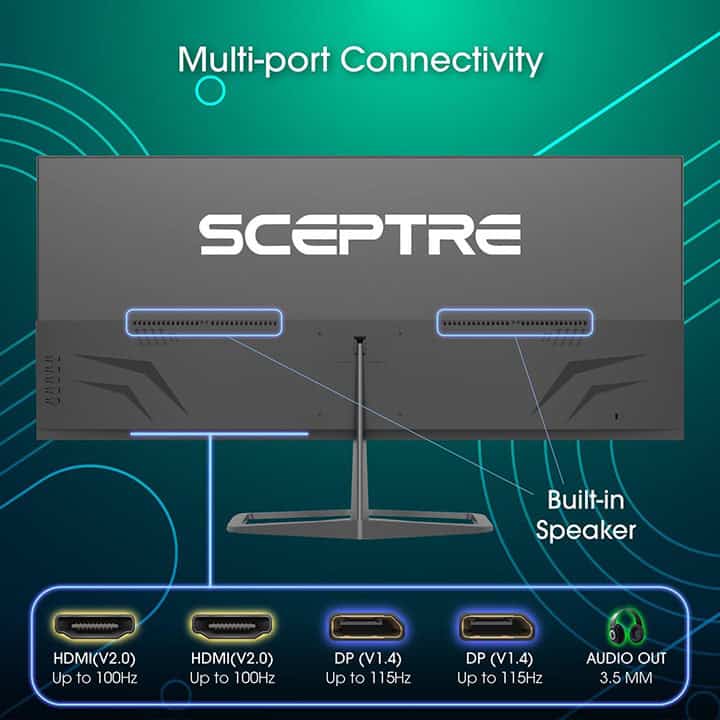
The stand of the monitor is tilt-only, but the screen is VESA mount compatible.
Connectivity options include two HDMI 2.0 ports, two DP 1.4 inputs, a headphone jack and dual integrated speakers for basic audio output.

Sceptre U275W-UPT
Best 4K Monitor
Size: 27”
Panel: IPS
Resolution: 3840×2160
Refresh Rate: 70Hz
VRR: N/A
G-SYNC: N/A
The Pros:
- High pixel density
- Affordable
- Up to 70Hz
- Vivid colors, wide viewing angles
The Cons:
- No AMD FreeSync
- Tilt-only stand
- IPS glow and mediocre contrast ratio (as expected from this panel technology)
About The Monitor
You can even find a 4K monitor below $200, though without some nifty features such as AMD FreeSync.
Image Quality
Even though it’s $50 – $100 cheaper than most budget 4K monitors, the Sceptre U275W-UPT features an IPS panel with wide viewing angles, 99% sRGB color gamut and a strong peak brightness of 350-nits!
4K UHD resolution results in a high pixel density of 163 PPI on 27″ monitors, which translates to plenty of screen real estate with crystal-clear details and text!
Keep in mind that you’ll need a powerful PC system to run the latest games at 4K with decent frame rates and picture settings. For office and everyday use, this won’t be an issue.
Just like most IPS monitors, the Sceptre U275W has a contrast ratio of 1,000:1, so don’t expect particularly deep blacks as that of VA panels.
However, it has a fast response time, so there won’t be any prominent trailing behind fast-moving objects. The monitor even supports 70Hz over DisplayPort for a very subtle boost in motion clarity as opposed to 60Hz.
Design & Connectivity

The stand of the monitor is fairly sturdy and offers tilt adjustment by -5°/15° as well as VESA mount compatibility via the 100x100mm pattern.
Connectivity options include DisplayPort 1.2 for 4K 70Hz, one HDMI 2.0 port (for 4K 60Hz), two HDMI 1.4 ports (limited to 30Hz at 4K) and a headphone jack.
Alternatives
Conclusion
This brings us to the end of our best gaming monitor under 200 USD buyer’s guide. As you can see, for just $200, you can get a pretty neat monitor.
Overall, the KTC 27M1 offers exceptional value for the price thanks to its vibrant colors, wide viewing angles, quick response time, smooth VRR performance and ergonomic stand.
In case you’d rather have a higher contrast ratio and don’t mind screen tearing, the Sceptre C305B is for you.
Finally, if you prefer a smaller 24″ screen, an IPS ultrawide or a higher 4K resolution display, the Sansui ES-G25F6Q Pro, the Sceptre E305B-FU200T and the Sceptre U275W-UPT will suit you fine.
Each monitor on the list has its advantages and disadvantages, so only you can know which one is the best for you.
Updates +
- February 14, 2026:
– Added the KTC H27E6 to the table. A review summary will be added soon. - January 23, 2026:
– Replaced the KTC H27T22 with the KTC 27M1, the KTC Q24T09 with the Sansui ES-G25F6Q Pro. - November 24, 2025:
– Added the ASUS XG259CMS and the Sansui ES-G25F6Q Pro to the table. Review summaries will be added soon. - September 4, 2025:
– Added the Sceptre E345W QU120D. - April 25, 2025:
– Added the Sceptre E305B-FU200T. - April 24, 2025:
– Added the KTC Q24T09.
– Removed the Acer XV275U (discontinued). - November 19, 2024:
– Added the Acer XV275U, the KTC H27T22, the KTC H27E22S and the Sceptre C305B-200UN1.
– Removed the Acer XV271U M3 and the LG 29WQ500. - August 2, 2024:
– Checked up on the guide to ensure that our picks are still the best options available. - November 11, 2023:
– Added more alternatives for the Acer XV271U M3. - August 7, 2023:
– Replaced the AOC C24G1A with the Koorui 27E6QC and the Gigabyte G24F-2 with the Acer XV271U M3. - December 29, 2022:
– Replaced the LG 24GN600 and the AOC 24G2 with the Gigabyte G24F-2.
– Replaced the LG 29WP60G with the LG 29WQ500. - November 24, 2022:
– Checked up on the guide to ensure that our picks are still the best options available. Be sure to check out ‘Alternatives’ for monitors that go for below $200 on sales. - August 1, 2022:
– Added the Sceptre U275W. - May 12, 2022:
– Replaced the LG 25UM58 with the LG 29WP60G. - February 10, 2022:
– Added the LG 24GN600.
– Removed the AOC G2590FX. - November 24, 2021:
– Checked up on the guide to ensure that our picks are still the best options available.


